
What E3.series 2027 Means for Different Engineering Teams
An electrical design platform serves more people than the engineers who create a schematic. Panel designers prepare enclosure layouts. CAD administrators maintain shared engineering environments. Production, commissioning, and service teams rely on the resulting project information.
E3.series 2027 introduces capabilities for each of these groups. Major additions expand browser access and connect mechanical panel data with electrical design, while smaller workflow improvements simplify navigation and create clearer documentation. Looking at the release by role makes it easier to identify the enhancements that matter most to each team.
Electrical Engineers
Electrical engineers use E3.series to create, organize, and document electrical systems within complex products. E3.series 2027 streamlines navigation in large projects and helps engineers communicate design intent more clearly.
Work Faster in Complex Projects
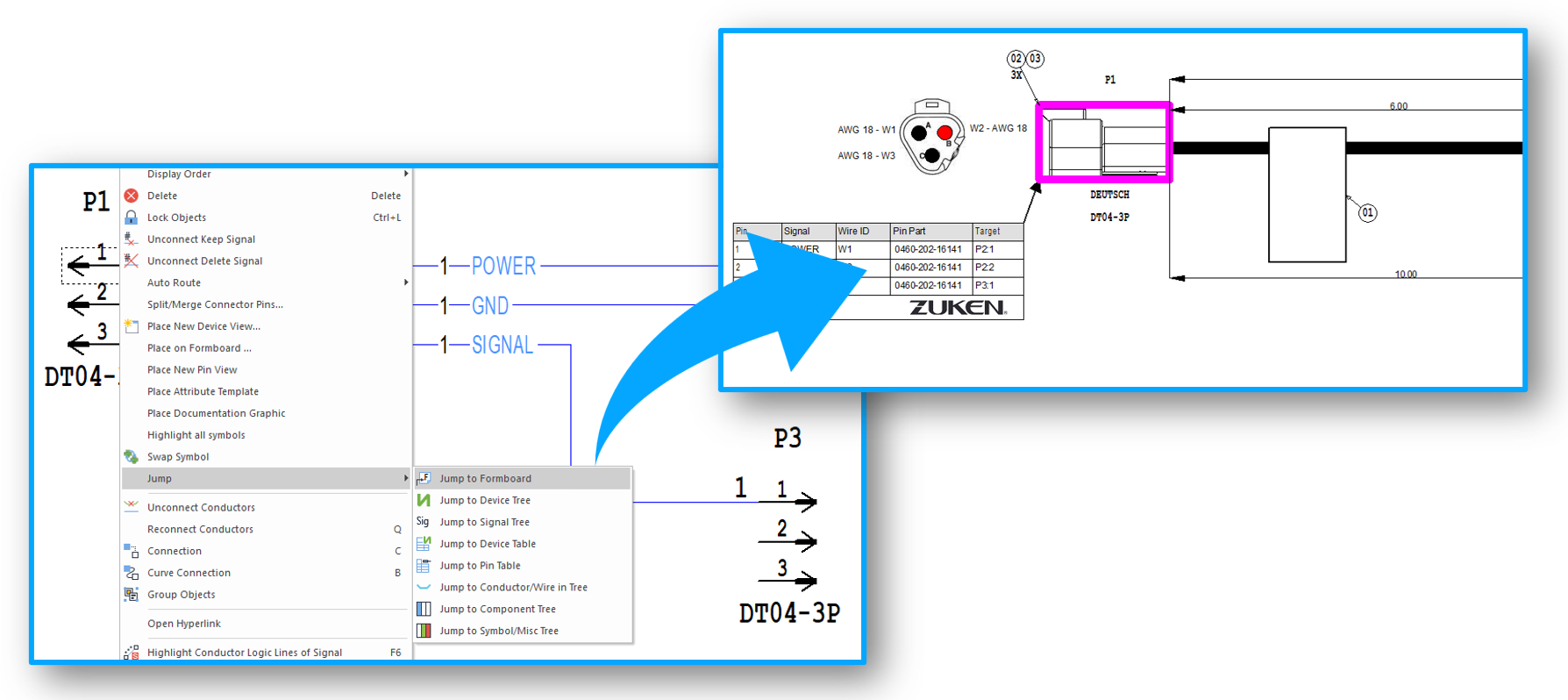
E3.series 2027 introduces three new Jump commands that help users move between related project objects:
- Jump directly from any object to its assigned variants and options in the tree.
- Locate objects on the Formboard from schematic views, the project tree, or tables.
- In the database editor, jump from a component model to its location in the Model tree.
These commands reduce the time spent searching for related information in large projects.
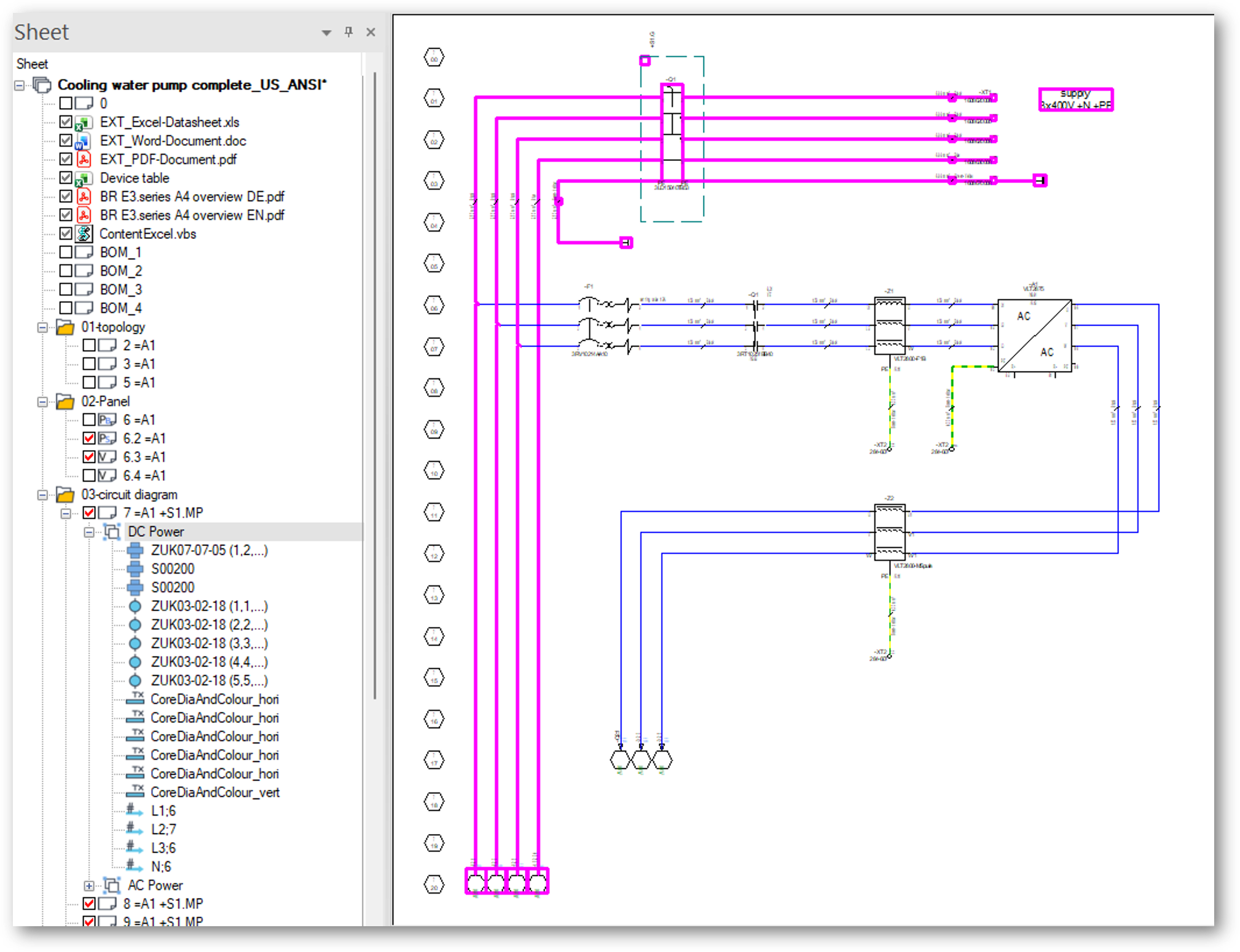
Object groups are also easier to find and manage. Groups and their elements can now appear directly in the project tree, giving engineers a clearer view of how objects are organized within the design.
Create Clearer, More Informative Drawings
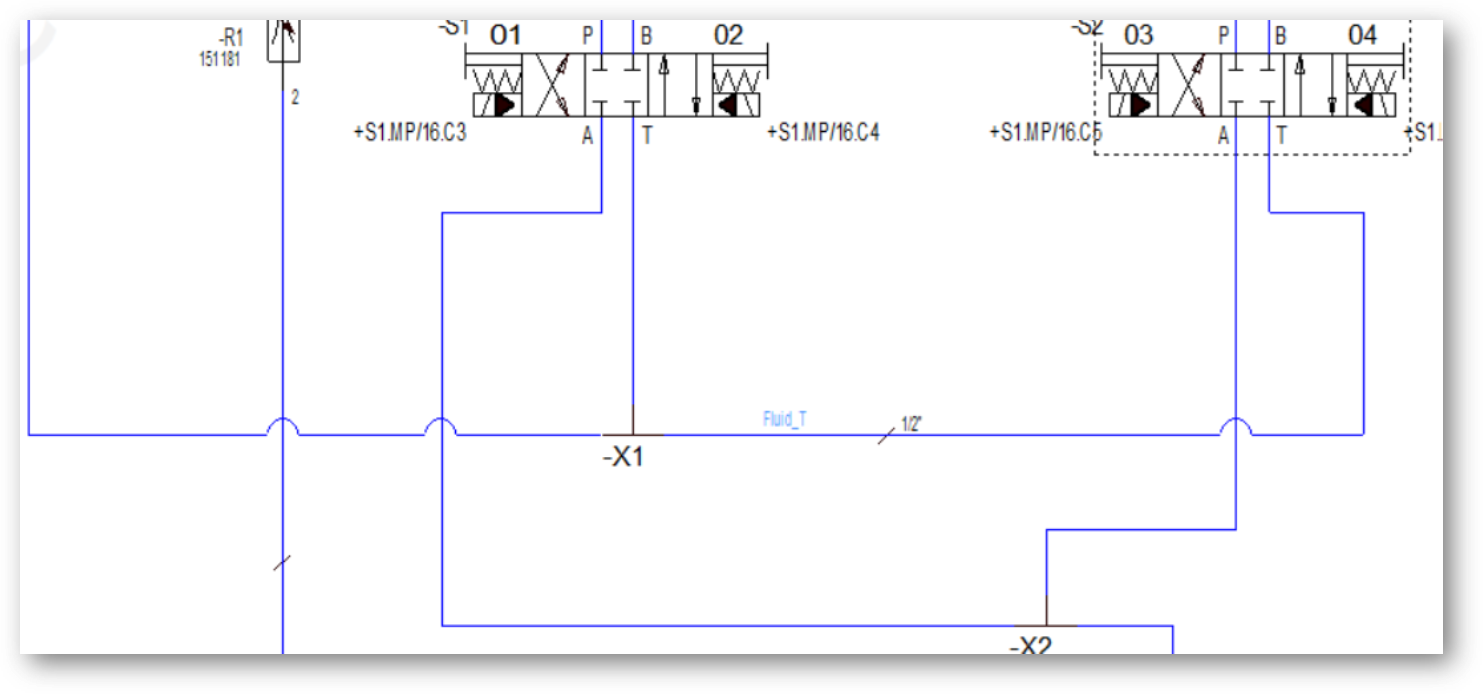
E3.series 2027 includes arc-style line jumps to show when two paths or conductors cross without connecting. This configurable option helps schematics represent nonconnected crossings as documented in IEEE Std 315-1975. The arcs clarify crossover points and help readers follow connections through crowded schematics.
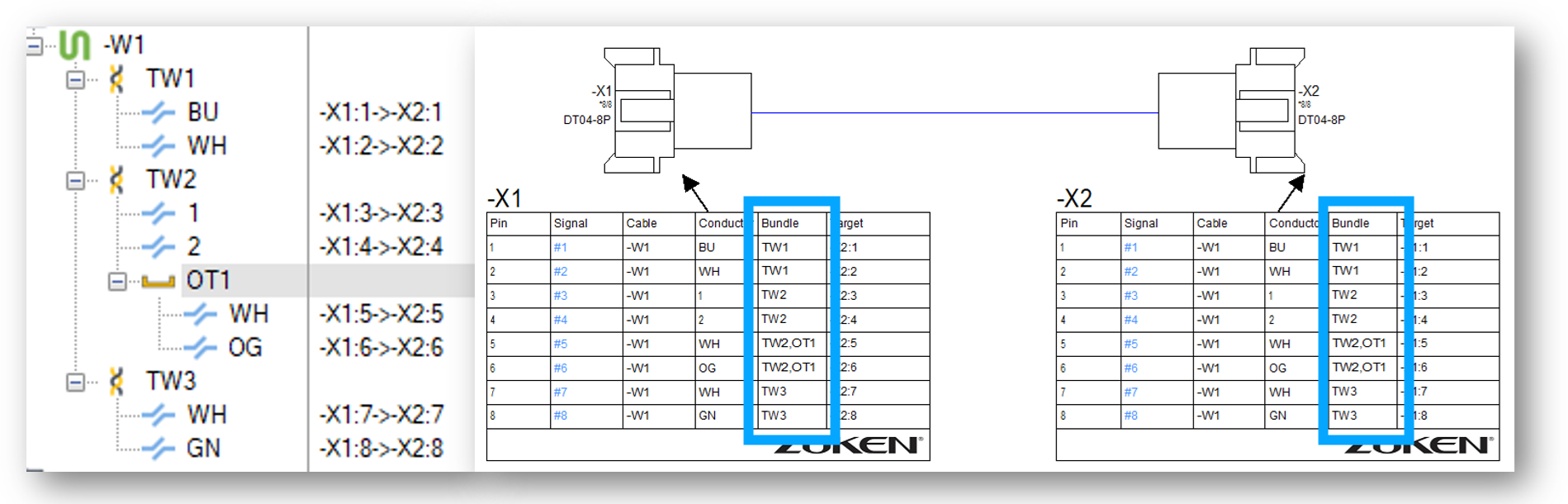
This release also adds two features that make shield information clearer in project documentation.
- Shield symbols are now recognized as connection targets, allowing shield termination wiring to appear in connection tables.
- Shield, twist, and bundle information can appear in dedicated formboard table columns, making conductor groupings easier to identify within multiconductor cables.
Together, these enhancements help engineers work more efficiently while producing documentation that is easier for others to understand and use.
Panel Designers
Panel designers use E3.series to arrange electrical components within an enclosure and prepare the design for manufacturing. E3.series 2027 helps them connect mechanical and electrical design data for clearer production documentation.
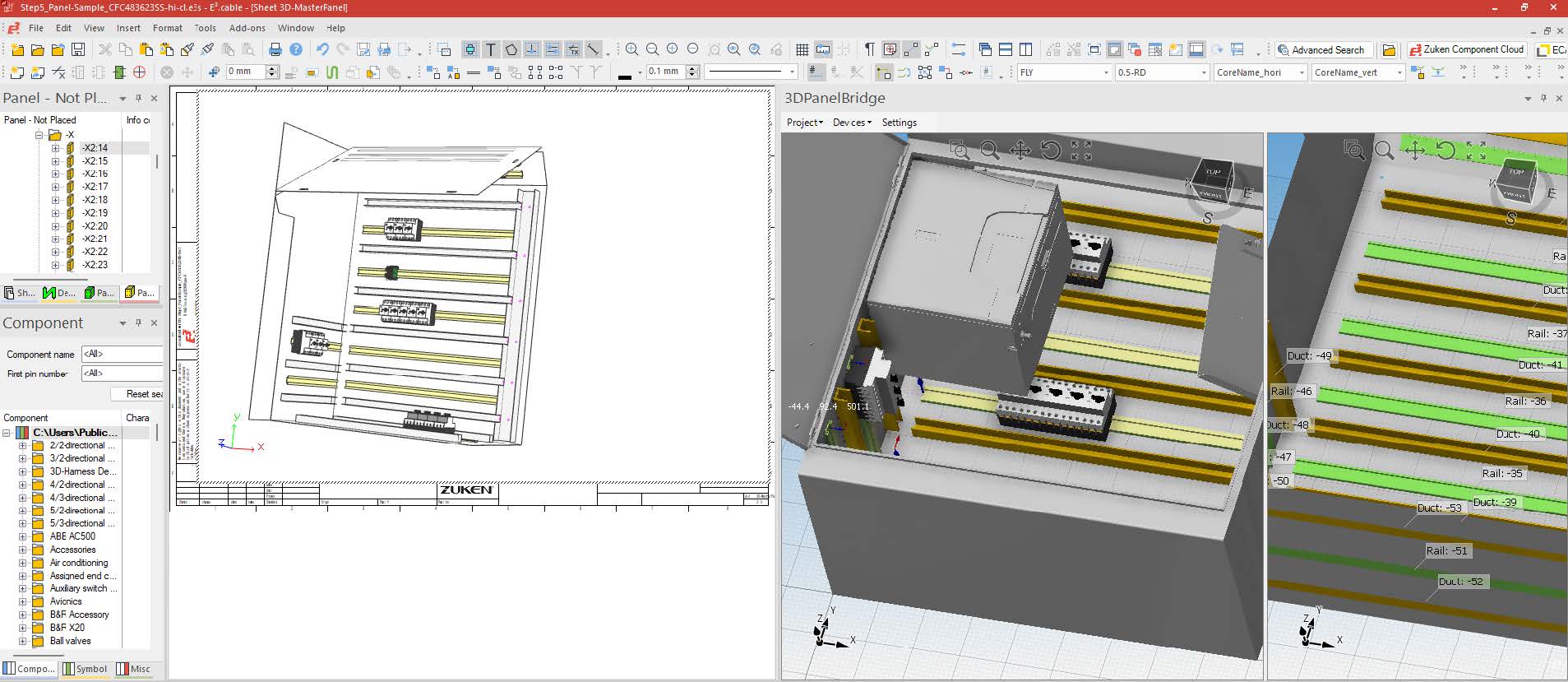
E3.3DPanelBridge brings mechanical panel data into the electrical design environment. Users can identify relevant enclosure geometry, such as plates, mounting rails, and cable ducts, and convert it into native E3.panel design objects. These objects can then support component placement and routing without requiring designers to rebuild the enclosure geometry manually.
The new 2D Manufacturing View extends this workflow into manufacturing documentation . Panel designers can generate multiple 2D views of an entire enclosure with a single command. The resulting documentation can include front, rear, and side views with dimensions and annotations, arranged according to first-angle or third-angle projection standards.
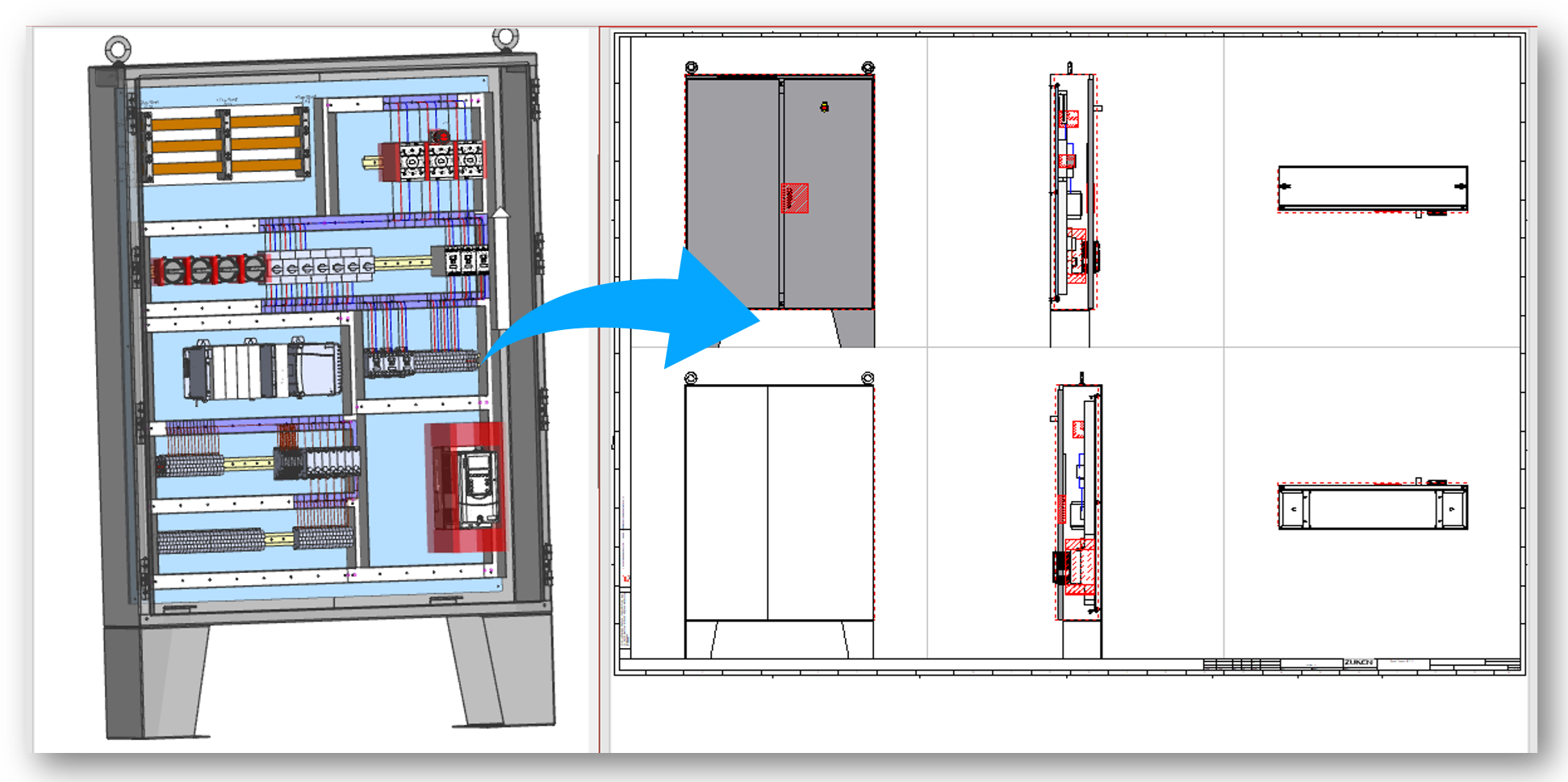
Instead of creating and arranging each projection separately, designers can produce a consolidated visual reference for manufacturing and assembly. In total, the 2027 release includes more than a dozen E3.panel improvements covering visualization, component placement, and routing workflows.
CAD Administrators and IT Teams
CAD administrators and IT teams help keep E3.series properly configured and secure for their organizations. E3.series 2027 introduces several improvements that support these responsibilities:
- Enterprise authentication: Kerberos authentication for the E3.series Multi-User Server integrates with Microsoft Active Directory, helping organizations apply their established authentication and security practices.
- Python add-ons: With the planned deprecation of VBScript, Python is the preferred scripting language for E3.series. Administrators can now define a default Python interpreter, streamlining script configuration within the application.
- Version checks: With a single command, administrators can compare the installed and latest available versions of E3.series and its add-ons. This helps organizations keep their software environment current.
Together, these capabilities make it easier to securely manage and maintain E3.series across an organization.
Production, Commissioning, and Service Teams
People outside the engineering department frequently need access to project data. Production teams may need to inspect a connection during assembly. Commissioning teams may need to trace a circuit while installing equipment. Service technicians may need current documentation while diagnosing a problem in the field.
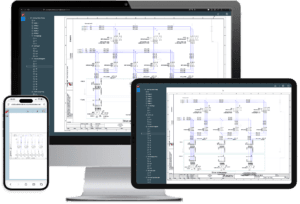
E3.CloudView provides controlled access to E3.series project documentation through a supported web browser without requiring a local E3.series installation. Users can view electrical schematics in 2D, explore panel layouts in 3D, and navigate project information using the Jump function.
This gives downstream teams the information they need without requiring a full engineering workstation. Administrators can control access in line with organizational requirements, limiting each user to the relevant project information. By extending project access beyond the engineers who create the design, E3.CloudView helps engineering data support the broader product lifecycle.
Find What Matters to Your Team
With more than 100 new features and enhancements, E3.series 2027 offers improvements for people throughout the engineering organization. Whether you create electrical designs, prepare panels for manufacturing, administer the software, or use project data downstream, the release includes new capabilities that can support your work.
The key is finding the enhancements most relevant to your role and workflows. Explore the release from your team’s perspective to identify opportunities to work faster, communicate more clearly, and make better use of engineering data.
See E3.series 2027 in Action:
- Attend the series 2027 webinar for demonstrations and a guided overview of the new software.
- Visit Zuken Global Support to download the latest E3.series release.
- Contact your Zuken account team to discuss which capabilities are most relevant to your organization.
Explore more series 2027 articles for deeper looks at the complete set of E3.panel enhancements, E3.3DPanelBridge, and E3.CloudView.

-
Application Engineer


- Blog

- Blog

- Blog
- Blog
- Blog
- Blog

- Blog