
E3.series Software Onboarding: How Zuken Helps Teams Get Started
Starting with a powerful engineering platform like E3.series can feel overwhelming. New customers must navigate installation, training, and configuration before the software delivers its full value. Zuken’s customer success team makes that path clear. The E3.series software onboarding process combines IT guidance, regular check-ins, and online resources. Together, these resources help teams become productive faster and establish consistent practices from the start.

Why E3.series Software Onboarding Matters
E3.series is an electrical engineering platform for designing wire harnesses, control panels, and complex electrical systems. Its centralized parts database, multi-user project capabilities, and automated error checks support a wide range of electrical design applications. These include automotive, aerospace, industrial equipment, and many others. However getting the most from E3.series requires proper configuration.
Successful deployment involves more than installing the software. IT teams may need to establish database connections, permissions, and shared file locations. Engineering teams must define drawing standards, create custom database parts, and agree on consistent workflows. Without proper guidance, teams may struggle to use E3.series to its full potential.
Zuken has a dedicated onboarding team to guide new customers through these early decisions.
Start E3.series Software Onboarding with a Customer Success Manager
Early in the onboarding process, each new E3.series customer is introduced to a customer success manager (CSM). The CSM becomes a consistent point of contact for questions, next steps, and access to the right resources to get started.
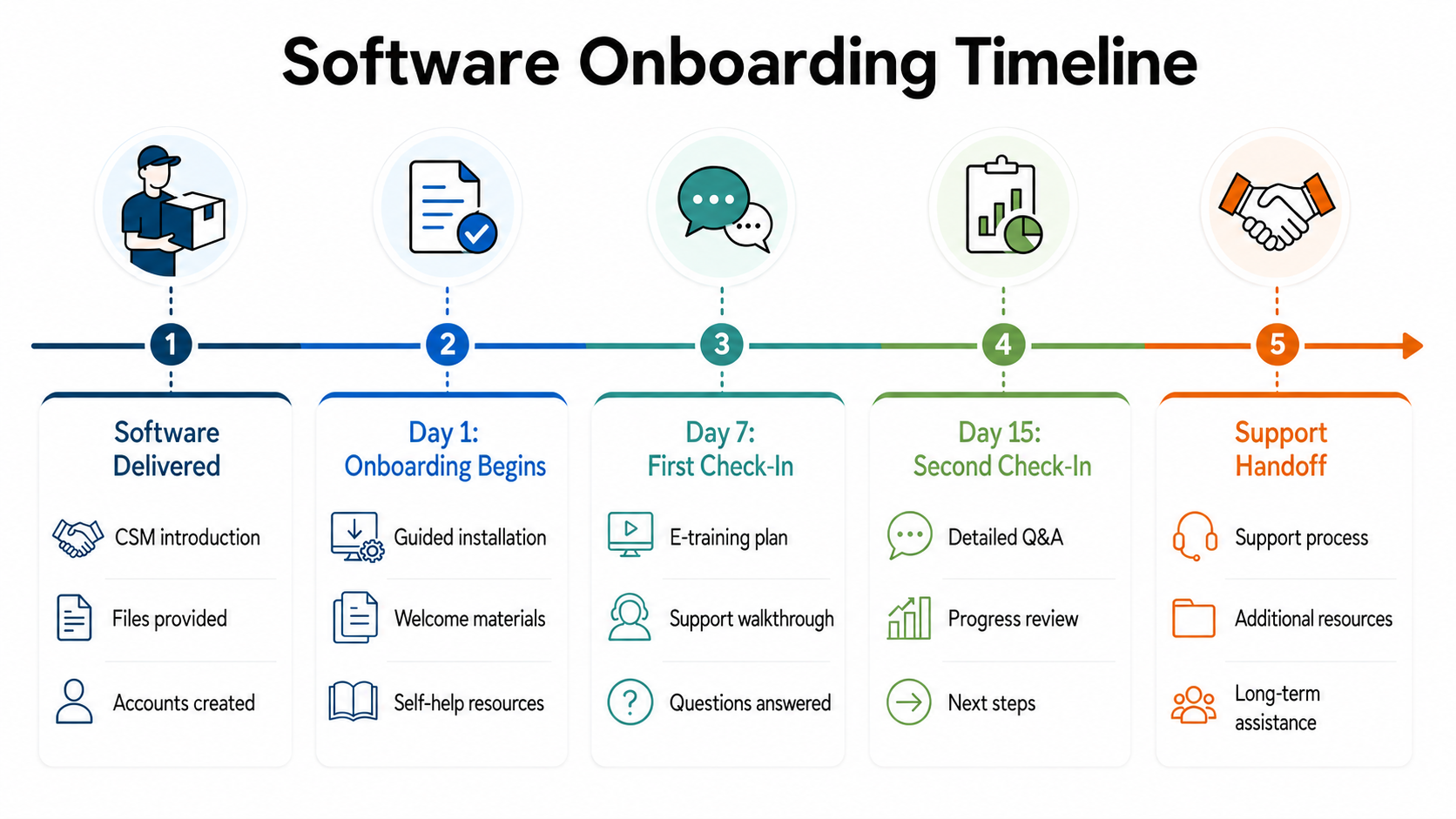
The customer success manager also guides customers through the technical steps required to begin using E3.series. Customers receive structured installation guidance and can ask specific technical questions during scheduled check-ins. Regular contact helps resolve issues before they delay training or productive use.
Customers also learn about resources for continued learning and support. These include self-help materials, a support hotline, and self-paced courses. With so many resources available, first-time users may not immediately know where to start. The CSM shows customers where to find information and which resource to use for different types of questions.
Build the Technical Foundation for E3.series
The customer success manager has technical expertise to help organizations get started with E3.series. The CSM coordinates with IT teams to install the software, configure licensing, and connect it to databases and shared file locations. Completing these steps gives engineers the environment they need to begin working in E3.series.
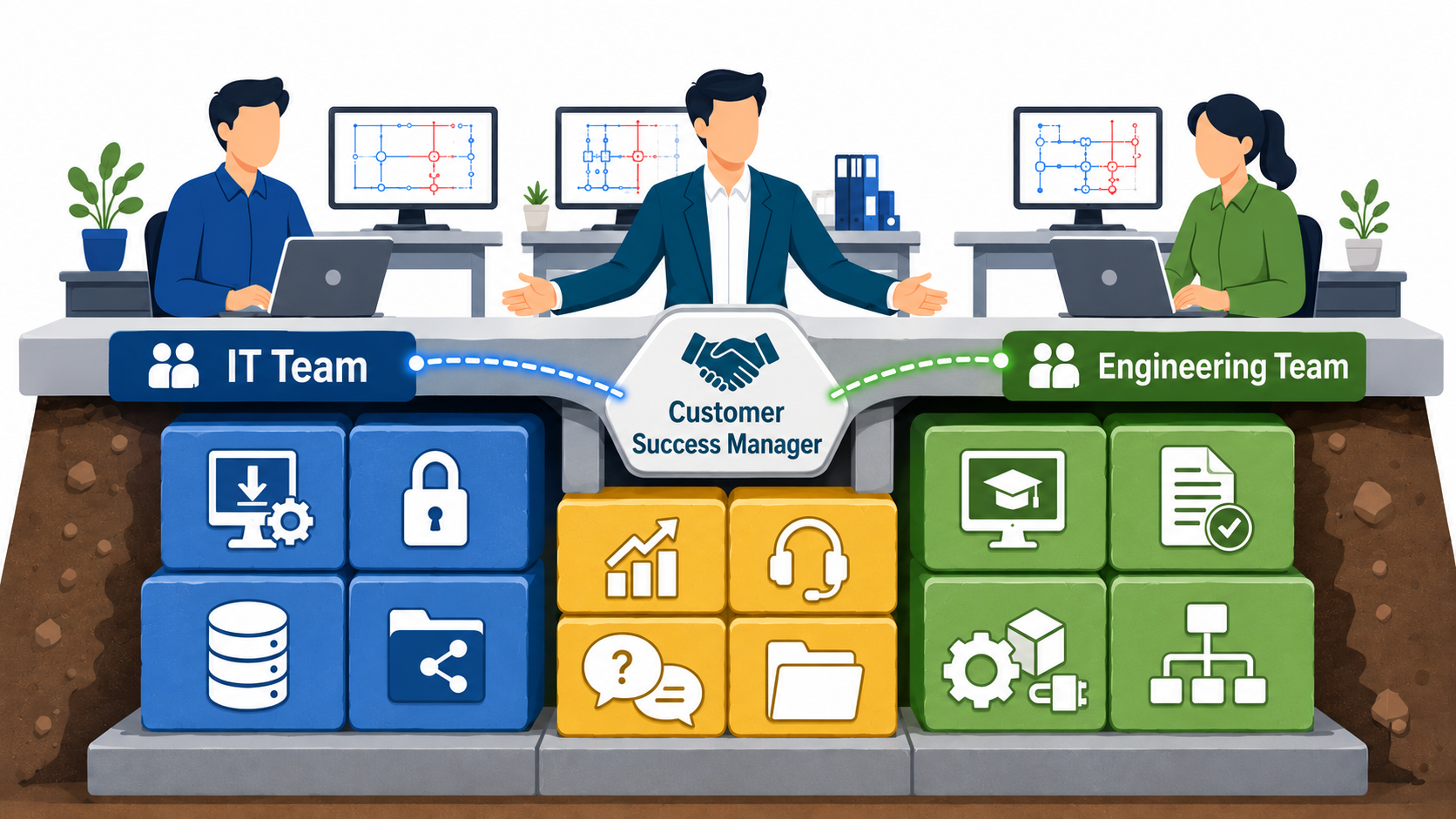
Once the software environment is ready, the CSM helps engineers establish consistent methods for using E3.series. Because Zuken’s customer success managers have electrical engineering backgrounds, they can also help teams define:
- Design standards: Approved symbology, drawing templates, and documentation requirements
- Library parts: Required components, part attributes, and naming conventions
- Engineering workflows: Design checks, project storage practices, and company-specific processes
Making these decisions early helps prevent inconsistent practices that become harder to correct later. A stable technical environment and clearly defined standards give teams a stronger starting point. They can move into real projects with confidence that E3.series is configured to meet their specific needs.
Building Long-Term Success with E3.series
At the 15-day check-in, the CSM reviews progress and answers any remaining questions. The CSM also confirms that customers know how to access training and technical support channels. However, support continues well beyond the initial onboarding period.
As new questions arise, customers can choose from several ongoing support options:
- Zuken Community Knowledge Base: Hundreds of self-help videos and articles address common questions and specific tasks.
- Zuken Community Chat: Users can quickly connect with an application engineer before moving to more specialized support channels.
- Zuken USA Forum: Users and Zuken personnel share knowledge, answer questions, and help one another solve problems.
- Zuken Global Support: Customers can submit technical questions, report issues, and request product enhancements.
- Dedicated account team: Technical and business contacts provide continued support as customers’ electrical design needs evolve.
- Coaching: Paid sessions with a CSM provide focused help for complex workflows or specific questions.
Together, direct assistance, self-service resources, and ongoing account support help customers expand their E3.series capabilities long after the initial onboarding period ends.
A Stronger Start with E3.series
Successful E3.series software onboarding involves more than installation. Zuken combines self-service resources with personalized guidance during installation, training, and early adoption. With early guidance and ongoing support, customers can become productive sooner and establish consistent E3.series practices for the long term.
Ready to get more from E3.series?
Contact Zuken to learn how our customer success team supports implementation, training, and long-term adoption.
Related E3.series Resources
- Intelligent ECAD system
- Zuken Community
- series Onboarding Part 1
- series Onboarding Part 2

-
Applications Engineer

- Blog
- Blog
- Blog
- Blog
Related Products and Resources

- Blog

- Blog
- Pages

- Products
E3.series is a Windows-based, scalable, easy-to-learn system for the design of wiring and control systems, hydraulics and pneumatics. The out-of-the-box solution includes schematic (for circuit and fluid diagrams), cable (for advanced electrical and fluid design), panel (for cabinet and panel layout), and formboard (for 1:1 wiring harness manufacturing drawings). Integrated with MCAD, E3.series is a complete design engineering solution from concept through physical realization and manufacturing output.