
E3.series Cloud Deployment: 4 Best Practices for Better Performance

Cloud infrastructure promises flexibility. Companies use cloud deployment to reduce on-premises server maintenance, scale resources more easily, and support teams across multiple locations. For many business applications, that shift can simplify IT operations.
However, engineering applications like Zuken’s E3.series need special consideration. They often rely on databases, libraries, and services that perform best when they are close to the user. A successful E3.series cloud deployment requires more than moving servers to a cloud provider. Teams also need to keep data accessible with minimal latency without disrupting day-to-day engineering work.
Why Do Companies Choose Cloud Infrastructure?
Cloud deployment moves computing resources from company-owned hardware to infrastructure hosted by a cloud provider. In an on-premises environment, servers, storage, networking equipment, and software are physically located and maintained within an organization’s own facilities. In contrast, a cloud environment hosts those resources in remote data centers operated by providers such as Amazon Web Services, Microsoft Azure, or Google Cloud Platform.
Companies choose cloud infrastructure for several reasons:
- Reduced hardware maintenance: IT teams can reduce the work required to purchase, maintain, patch, and replace physical servers.
- Scalability: Computing resources can be scaled up or down as business needs change.
- Cost structure: Cloud services can shift some infrastructure spending from capital purchases to operating expenses.
While many IT teams choose cloud infrastructure to streamline costs and reduce administrative workload, the architecture must still support the application’s performance requirements.
Why E3.series Cloud Deployment Can Be Sensitive to Latency
Cloud-hosted applications respond more slowly when the application, its data, and its users are separated by network latency. The difference may be imperceptible in standard business software, but it can be noticeable in engineering CAD applications.
One reason is simple: data has farther to travel. In cloud environments, the data center can be hundreds or thousands of miles away. Physical distance and network routing add latency to each request. Over thousands of requests, engineers notice the difference.
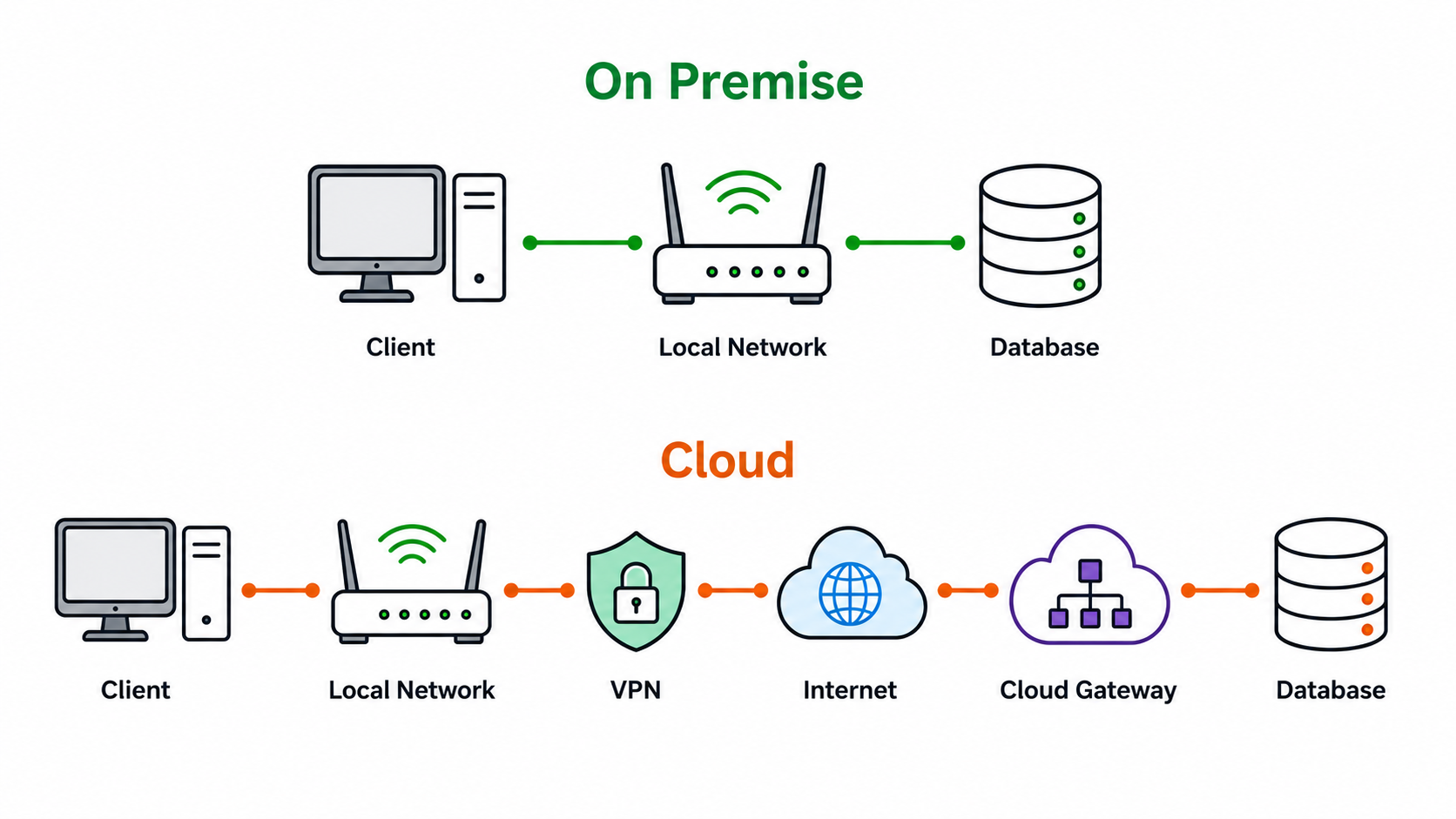
The connection path is more complex in a cloud deployment. Local networks often have direct communication paths between nearby systems. Cloud database requests may pass through extra stops, such as a VPN or cloud gateway, before reaching the server. Also, because those requests travel over the internet, bandwidth and network conditions can further affect performance.
The problem can become more noticeable for distributed workforces:
- Work from home: Home internet connections may be slower or less predictable than company networks.
- VPN: Extra routing can add delay and make performance harder to predict.
- Multiple locations: A cloud data center near headquarters can still be far from overseas offices and remote teams.
This is one reason cloud deployment architecture matters. Moving a database to the cloud without considering how the data will be accessed can create a very different user experience from hosting it on-premises.
Other Considerations for E3.series Cloud Deployment
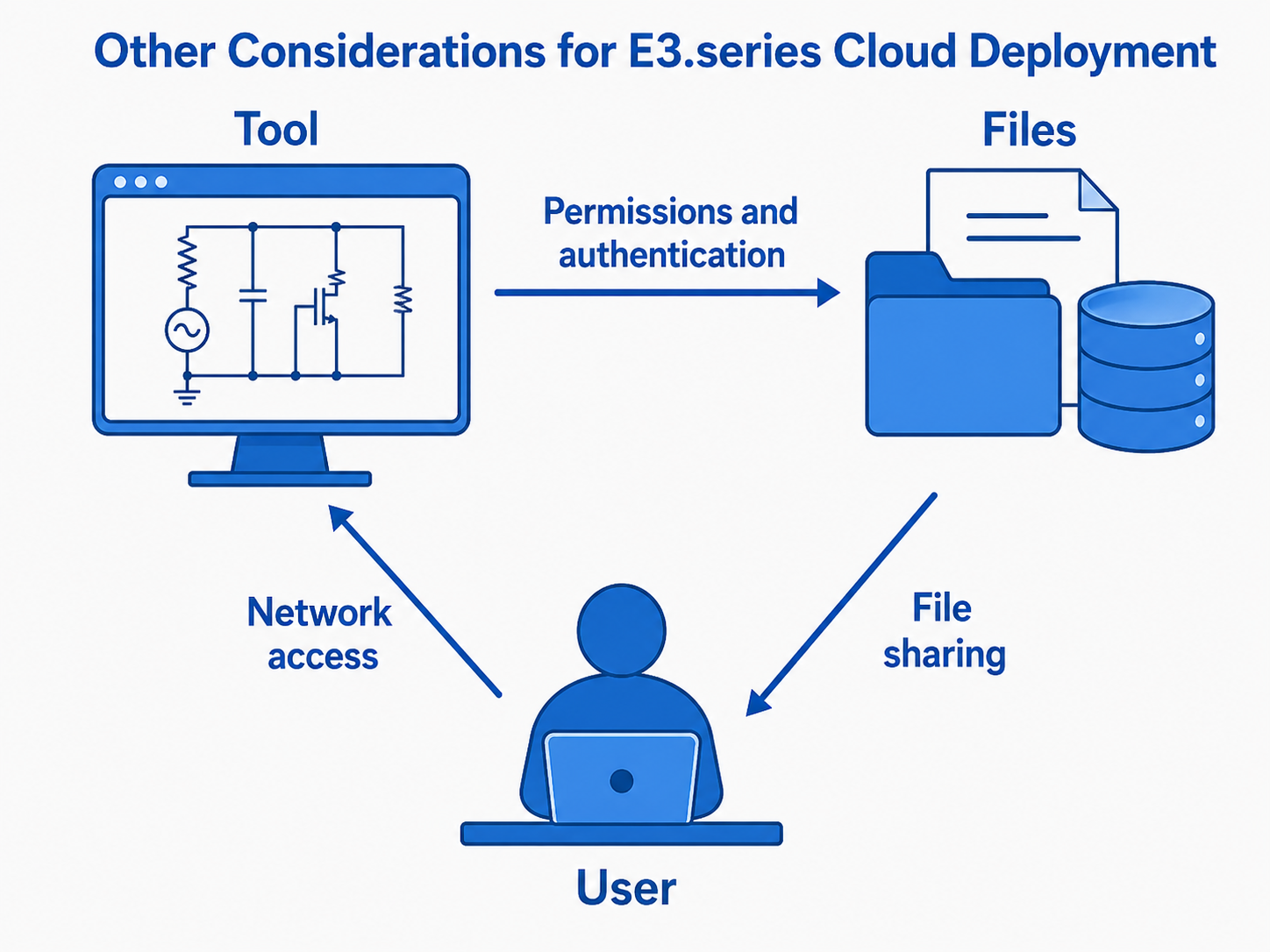
While latency is usually the most noticeable performance concern, it is not the only one. Moving engineering infrastructure away from local servers can also change how users connect, how permissions are managed, and how shared files behave.
Network access
Companies with cloud-based infrastructure need to secure data access properly. IT teams use VPNs and other cloud services to isolate an organization’s data from the public internet. Configuring ports and navigating multiple layers of security can be complicated.
For E3.series, those controls also need to allow the communication paths required by the application, licensing services, databases, and other supporting services.
Permissions and authentication
Organizations moving from traditional on-premises Active Directory to Microsoft Entra ID may encounter migration challenges for applications that depend on domain controllers, Windows authentication, and local permission structures. As a result, authentication and permissions should be reviewed as part of the E3.series cloud deployment plan rather than after the infrastructure move.
File sharing
Traditionally, organizations used network file shares on local servers to let employees access shared data as if the file were stored on their own machine. As companies move to cloud-based file-sharing tools, latency and synchronization issues can pose problems for complex engineering software. Large CAD files and engineering libraries may take time to synchronize, and availability can be affected while synchronization is in progress.
Engineering CAD tools like Zuken E3.series repeatedly access shared data, so slow file access will affect application responsiveness. Some organizations try to work around cloud latency by synchronizing local copies on user machines. However, if multiple users write to the same shared file simultaneously, the sync process can result in duplicate copies, file corruption, or data loss.
For teams that need controlled, multi-user access to shared engineering data, E3.enterprise provides an architecture specifically designed for multi-user E3.series environments.
E3.series Cloud Deployment Best Practices
1. Keep E3.series infrastructure on premises when appropriate
When performance is the priority, organizations can keep E3.series databases, libraries, licensing tools, and services on local infrastructure. While E3.series supports cloud deployment, IT teams that prefer cloud infrastructure for most tools should account for the specific performance requirements of engineering software.
The right approach depends on the organization’s infrastructure strategy, user locations, and performance requirements.
2. Use Remote Desktop to co-locate the application and databases
For multi-site engineering teams or organizations without on-premises server capacity, a cloud-hosted environment may be preferred or required. In these cases, Zuken recommends running the E3.series client close to the cloud-hosted servers.
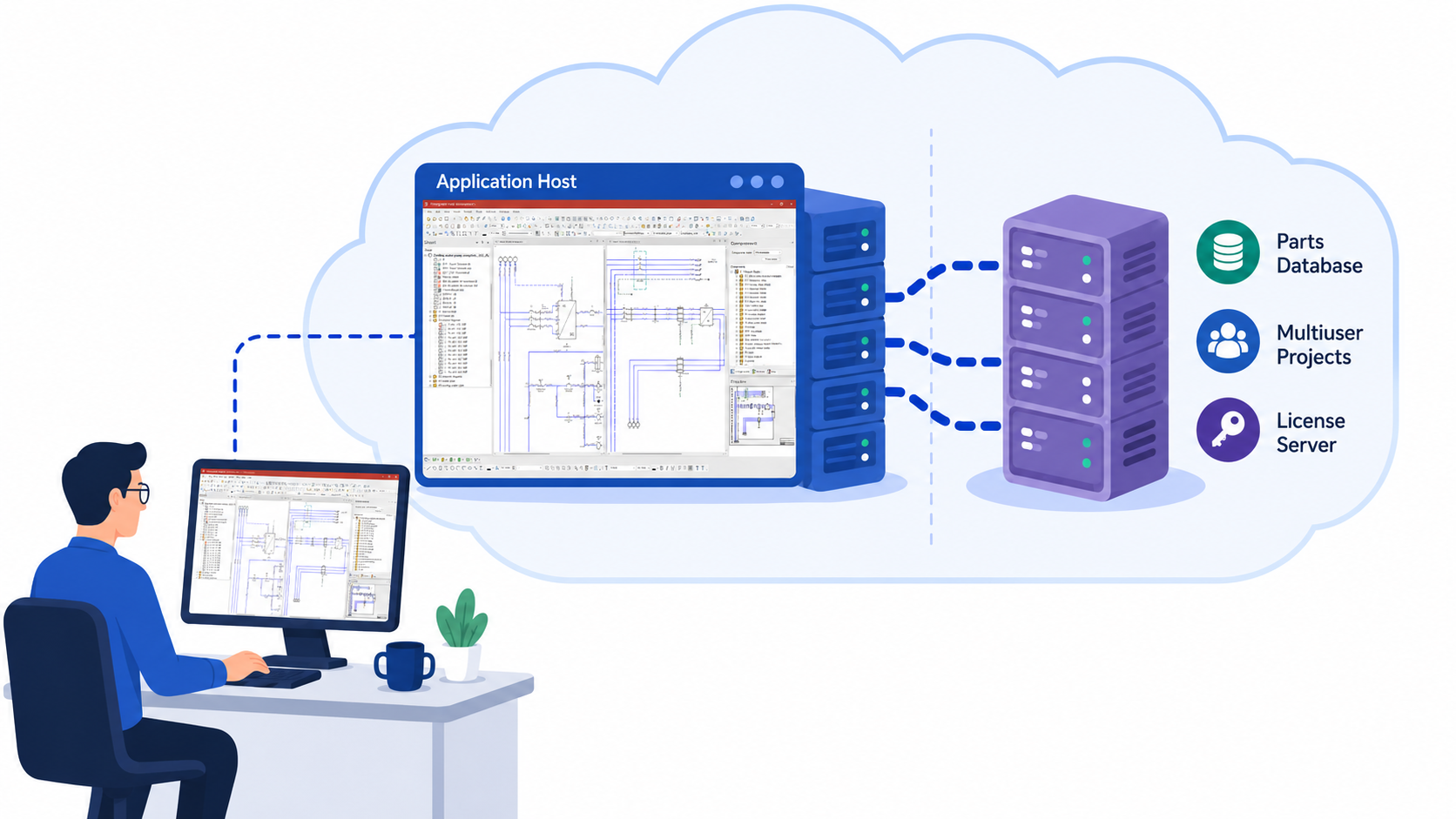
The preferred approach is to use Citrix, Terminal Services, or a cloud-hosted virtual machine (VM) so the E3.series application and its data remain close together within the cloud environment.
Users then access the VM through Remote Desktop Protocol (RDP). This approach is less sensitive to latency than sending frequent database queries across a long-distance network connection.
For many E3.series cloud deployment scenarios, this distinction is critical: keep high-volume application-to-data traffic close together, then send the user interface across the remote connection.
3. Choose a cloud region close to users
Some organizations cannot use virtual machines. In these cases, E3.series can still access cloud-hosted databases from a local installation.
IT teams can reduce latency by selecting a cloud region close to the primary user base. However, a locally installed E3.series client accessing cloud-hosted data will experience more latency than the remote desktop approach described above.
For geographically distributed teams, IT should evaluate where most users are located before selecting the cloud region rather than defaulting to the region closest to headquarters.
4. Work with Zuken on the final configuration
Cloud infrastructure adds complexity around ports, VPNs, permissions, licensing, databases, and application connectivity. Zuken implementation consulting services can help organizations evaluate and configure these elements for their specific E3.series deployment. The goal is to secure the cloud environment without blocking communication paths that E3.series needs to function.
Plan E3.series Cloud Deployment Around Application Performance
Cloud infrastructure has many advantages, but E3.series cloud deployment requires more than simply relocating servers.
A well-planned configuration keeps the application, databases, libraries, and supporting services close enough to minimize latency. Remote desktop infrastructure, appropriate cloud-region selection, and careful network and security configuration can also help teams maintain reliable access to engineering data.
Planning an E3.series cloud deployment? Contact Zuken Services to discuss your infrastructure, user locations, performance requirements, and deployment options.
Keep learning:
- Learn more about Zuken’s Services team
- Read how consulting improves deployment success
- Visit the E3.series product page about multiuser projects and library data management
- Watch this extended video on how E3.series multiuser works

-
Applications Engineer

- Blog
- Blog

- Blog
- Blog
Related Products and Resources
- Blog
- Blog
- Blog

- Blog