What Panel Engineers and Manufacturers Need to Know About E3.panel 2026
Panel engineers face increasing complexity and tighter timelines. They need smarter tools to accelerate design without sacrificing accuracy. E3.panel 2026 delivers smarter automation, streamlined workflows, and enhanced 3D handling to help panel engineers design faster and document with confidence.
The challenge
Modern control cabinets pack more devices into less space. That raises routing difficulty, creates more manual edits, and slows change management. Teams must maintain data consistency from design to manufacturing, while minimizing rework and delays.
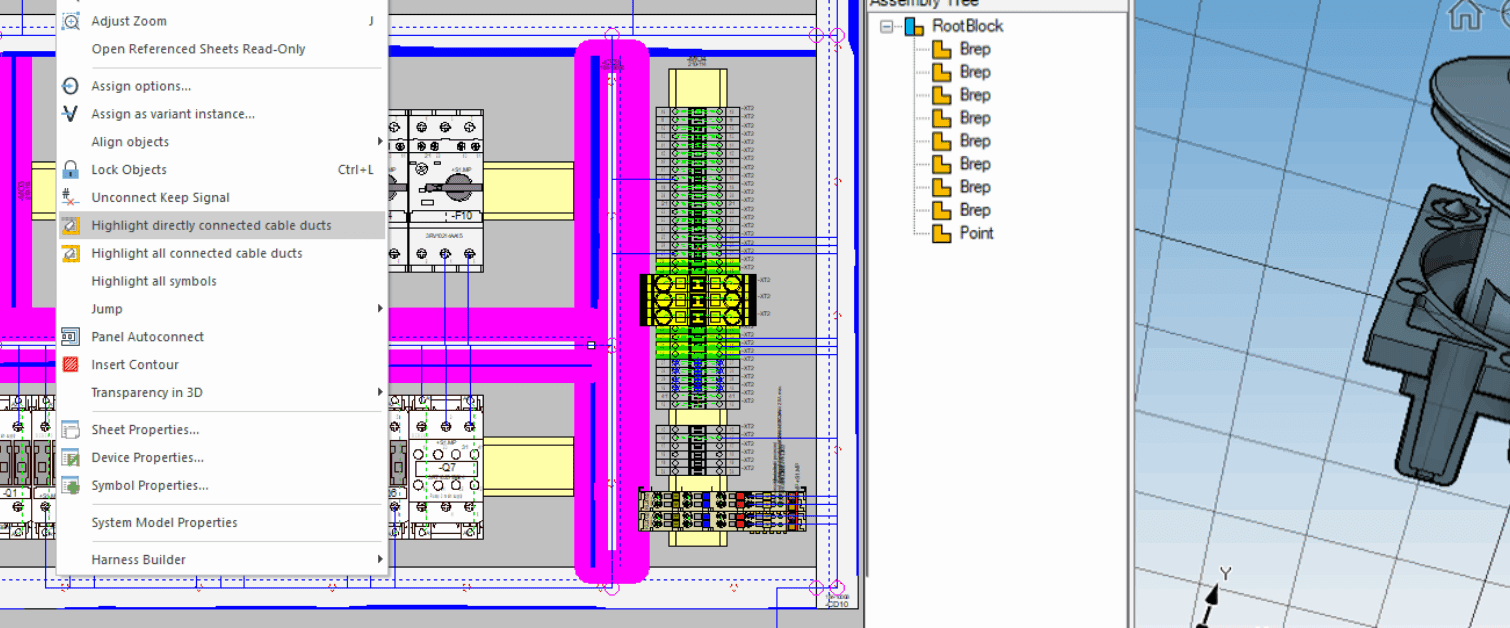
Highlight connected cable ducts (Design faster)
Auto-routing minimizes wiring paths and accurately estimates cut length accurately, but only when ducts connect correctly. In complex layouts, misplaced adjacent ducts can appear linked but remain unconnected, breaking routing paths.
E3.series 2026 adds two visual commands to expose connectivity:
- Highlight directly connected cable ducts – Shows ducts directly linked to the selected duct, revealing the initial routing path.
- Highlight all connected cable ducts – Shows the entire network of connected ducts.

These new visualization commands clarify duct connectivity, allowing engineers to validate routing paths in seconds and prevent broken routes.
Resize multiple rails and ducts at once (Speed and consistency)
Consistent mounting rail and cable duct sizing ensures clean layouts and efficient assembly. Engineers often start with varying widths and lengths to fit components or manage space constraints. Upon completion, the design typically has consistent dimensions, which reduces cutting complexity and streamlines the mounting process.

Consistent rail and duct sizes simplify cutting and assembly. In earlier releases, matching lengths meant repetitive edits. E3.panel 2026 allows you to adjust dimensions for multiple ducts or rails simultaneously through Device Properties. The result is faster cleanup, fewer errors, and consistent manufacturing data.
E3.panel 2026 simplifies this process by allowing engineers to adjust the dimensions of multiple ducts or rails simultaneously through the Device Properties dialog. This eliminates repetitive one-by-one edits and ensures uniform dimensions for selected components. The result is faster cleanup, fewer errors, and consistent manufacturing data.
Slot rotation for components (Accurate placement for complex mounting)
Electrical components often have complex mounting between them, for example, terminal blocks on PLC modules, contact blocks on door operators, or buttons on sloped surfaces.
Manual workarounds slowed and invited mistakes. In the Database Editor adds precise slot rotation controls, allowing engineers to set rotation angles when modeling the component in the parts library:
- Slot Points: Enter any angle to match the angled surface
- Slot Lines: 0° or 180°
Place the component, and the orientation is correct the first time. This addition eliminates a tedious modeling step and improves consistency.
Simplify STEP model import (Faster 3D handling)
Accurate 3D layouts require STEP models, but excess detail slows performance. Importing STEP models into the E3.series database powers the digital workflow.
E3.panel 2026 introduces two new features to import STEP models with fewer details. These options reduce design time while maintaining the precision needed for 3D layouts.
Skip sides during STEP import
STEP models are typically designed with great mechanical detail that is not always necessary in ECAD design. For example, side views are often hidden once multiple devices are mounted together, so simplifying graphics wouldn’t impact accuracy.
E3.panel 2026 introduces a new option that allows librarians to skip specific sides of a STEP model during import.
STEP editor plugin
The plugin is a new external tool that gives librarians more control over STEP model imports. With this plugin, librarians can view a STEP model and select specific elements to import into the E3.series library.
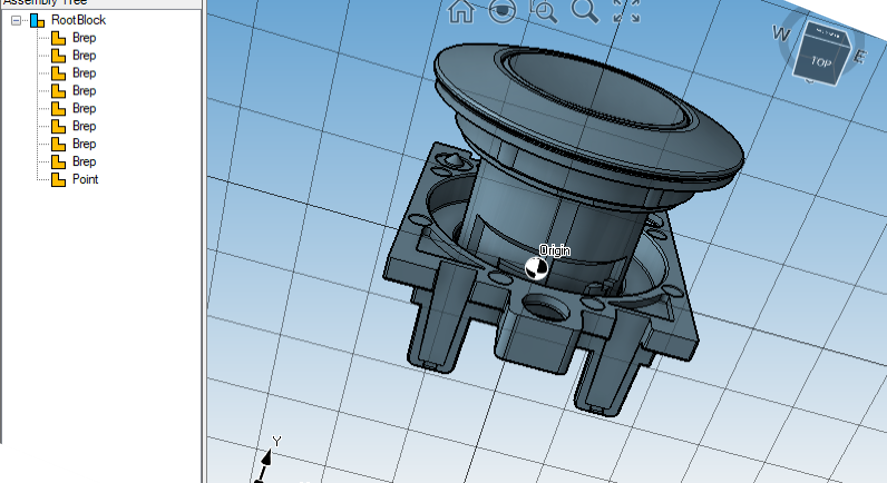
This approach reduces model size and improves performance, especially for complex assemblies such as complete enclosures that include doors, bodies, and mounting plates. In these cases, individual elements can be imported separately into the E3.series database for maximum flexibility.
The E3.StepEditor is a separate install on ZGS, and does not require an additional license.
Handle Unique Structures (Real-world enclosures)
Enclosures with a sloped surface
Control cabinets and enclosures often include sloped surfaces, such as roofs or angled panels. In previous versions of E3.panel, modeling these areas required extra steps.
With E3.panel 2026, engineers can now model surfaces with rotation, combining angled areas into one piece with the cabinet enclosure. You achieve accurate alignment when mounting components onto the sloped surface, eliminating any legacy workarounds.

Route wires through cutouts
Cable Duct Docking now supports automatic wire routing through cutouts.
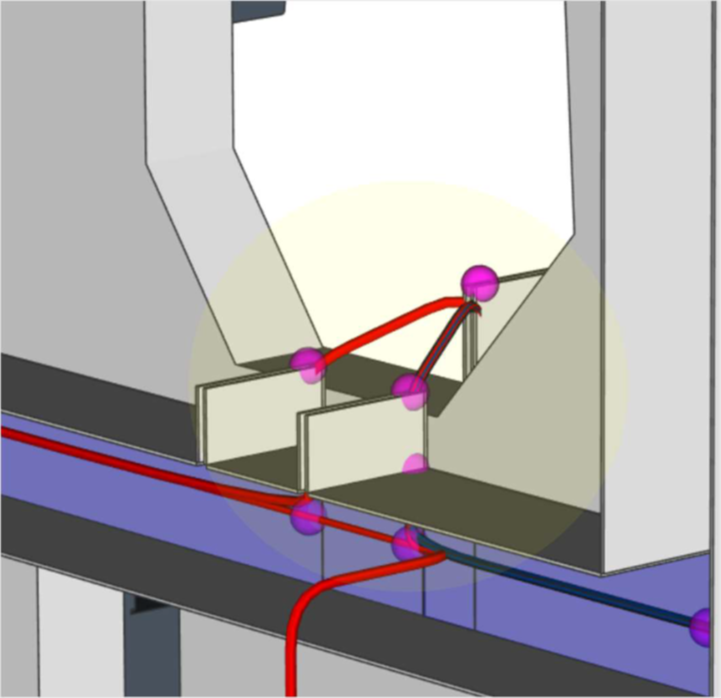
Define cable ducts that route through a cutout so they:
- End on the border or inside the cutout
- Sit on different slots
- Face different directions
Once cable ducts are properly defined, the system auto-routes wires through the cutout, resulting in faster design and optimized wiring paths.
Conclusion
E3.panel 2026 focuses on speed, precision, and smarter workflows. With new visual aids, streamlined STEP model handling, and enhanced control for unique structures, these features help engineers, designers, and librarians simplify complex layouts, reduce manual edits, and maintain data consistency across design and manufacturing.
Next Steps:
- Download: Get series 2026 from ZGS and start using the new features.
- Watch: Upcoming webinar—What Panel Engineers and Manufacturers Need to Know About E3.series 2026.
- Explore: Visit the series Panel product page.
- Talk to us: Contact your account team to discuss how E3.series can modernize your panel design workflow.

-
Applications Engineer

- Blog

- Blog

- Blog
- Blog
- Blog
- Blog
- Webinar