
Improving the MBSE Software User Experience with GENESYS 2026
Large models should not slow down good engineering work. Yet for teams using GENESYS every day, slow navigation, long load times, and cluttered views can turn routine modeling work into a frustrating bottleneck.
Over the past several releases, we introduced major new capabilities for organizing model data, visualizing system information, and standardizing communication. With GENESYS 2026, we shifted our focus. We improved the features you rely on every day to create a stronger MBSE software user experience, making them faster, smoother, and easier to use.
These updates help users manage complex system definitions more effectively and consistently. Positive feedback confirms that GENESYS is moving in the right direction.
We also listened closely to critical feedback. Some areas did not fully support users in their daily work. With GENESYS 2026, we shifted our focus. We improved the features you rely on every day, making them faster, smoother, and easier to use.
Why MBSE Software User Experience Matters
Software systems grow more complex over time. GENESYS is no exception. At some point, adding new features is not enough. MBSE software also needs to remain intuitive, responsive, and efficient.
Performance issues can disrupt workflows. Complex interfaces can overwhelm users. Progress is not just about adding features. It also requires refining and improving what already exists.
GENESYS 2026 reflects that mindset.
Driven by Your Feedback
Your feedback directly shaped the development of GENESYS 2026. This includes input from customers and evaluators focused on performance, usability, and responsiveness. We made those areas top priorities, and we refined features based on your suggestions.
Here is some of what we heard:
“…response time lags when I…”
“…interface looks cluttered and a little dated…”
“…large file exports take FOREVER…”
“…why does it freeze or crash when I….?”
“…diagram X layout feels a bit rigid…”
Faster MBSE Performance, Backed with Real Numbers
Many users work on large, complex projects in GENESYS. These projects often span multiple engineering disciplines. Some models could contain hundreds of thousands of elements. Managing this data requires strong performance and a reliable MBSE software user experience, especially when teams work across large models and distributed environments.
Users reported slowdowns in imports and exports. They also experienced delays in navigation and diagram loading. Report generation often took too long. These delays reduced productivity and added friction to everyday modeling work.
Our development team re-engineered key workflows, focusing on backend performance. We tested the new engine extensively and found:
- Up to 100x faster diagram loads
- Large project load times cut in half
- Up to 224x faster client-server setups for efficient remote collaboration
- Up to 5x faster report generation times
You can now spend more time working and less time waiting, whether you are in a local or remote environment. These results reflect our internal testing, and we look forward to hearing about your experience.
More Flexibility in Diagram Options
A major strength of GENESYS is automated visualization. Users can generate views for specific entities instantly. You do not need to recreate diagrams manually. The system provides a strong starting point. Users can modify and save views freely, without affecting model integrity.
GENESYS 2026 expands customization options across diagram types, making views easier to arrange, read, and share.
Hierarchical Diagrams
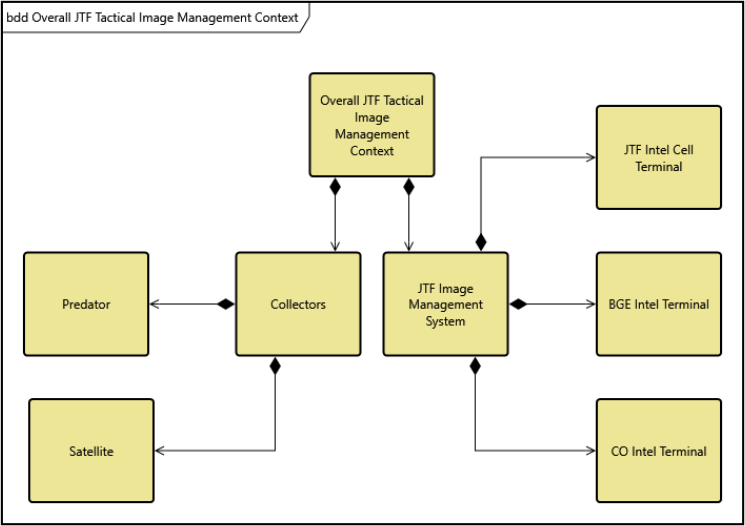
We removed many layout constraints. Nodes can now move more freely within diagrams. Hierarchical views support many types of relationships, and users can now arrange them more flexibly.
This approach enables more expressive diagrams without forcing users into strict top-down layouts.
Org-chart Style Diagrams
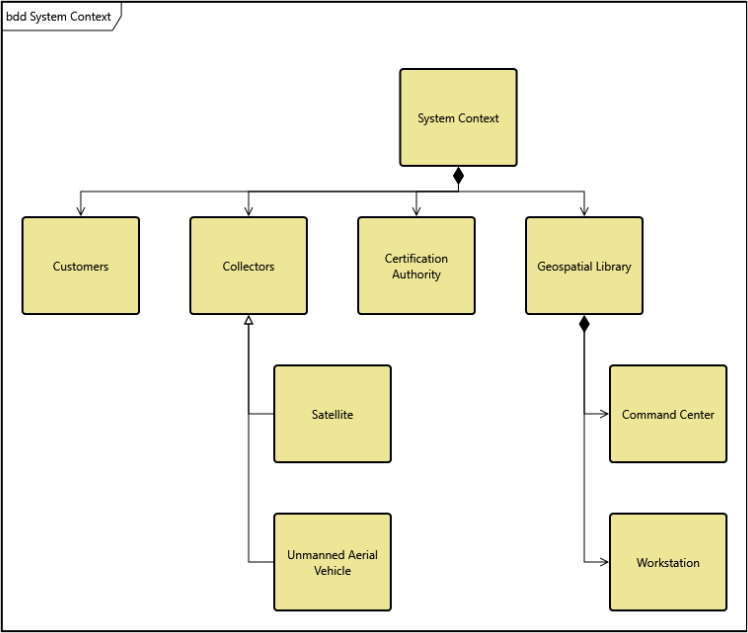
GENESYS supports both system modeling and organizational analysis. Process flows and team structures are both important to model.
We introduced an org-chart style layout. This format supports complex relationships across multiple levels.
Users can visualize lateral and cross-functional connections. They can also represent hierarchical relationships clearly.
Orthogonal Flow Routing
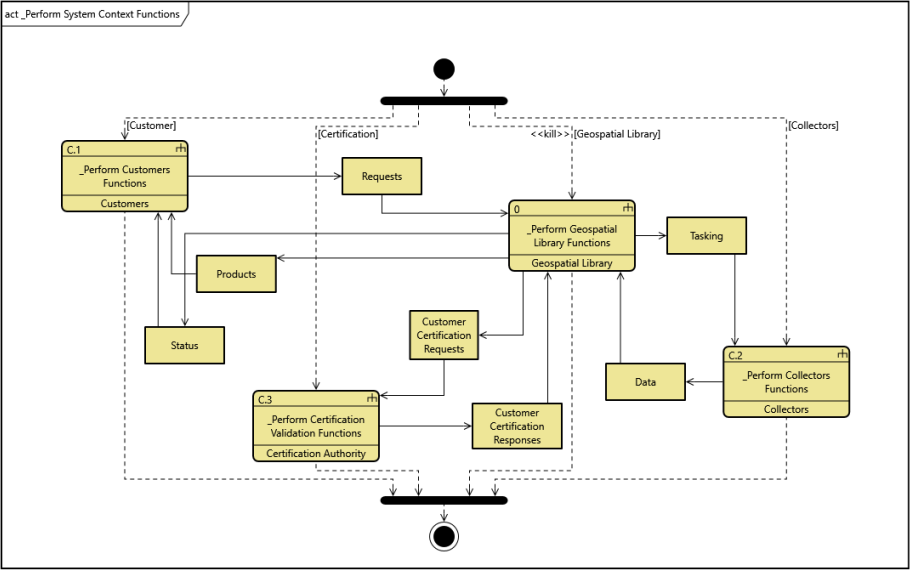
We improved how flow diagrams handle connections. Flow lines can now follow orthogonal routes, reducing visual clutter and improving readability.
Users can place nodes more naturally. They no longer need to arrange layouts around line constraints.
Flexible Node and Flow Data
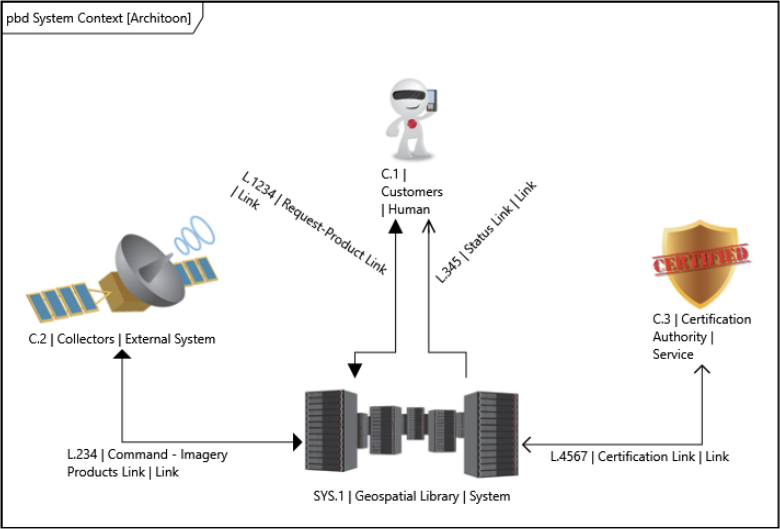
We removed restrictions on annotation placement. Users can now position labels more freely. You no longer need to adjust layouts to accommodate text or omit important data.
This makes diagrams clearer and easier to understand.
Report Generation at the Speed of Now
GENESYS has long supported powerful reporting capabilities. Users can generate detailed, customized reports. The platform includes a built-in report designer that helps users navigate model structures and generate the reports they need.
The previous reporting engine struggled with large datasets, resulting in a poor user experience. We upgraded to DevExpress v24. This version is faster and more efficient.
Testing showed major improvements. Report generation is now up to five times faster. A report that once took five minutes can now be generated in about one minute, with no loss of data quality.
See the Difference for Yourself
This release does not slow innovation. It enables faster progress moving forward. We strengthened the foundation of GENESYS to support long-term performance, usability, and scalability, and a better MBSE software user experience.
Innovation is not only about new features. It also means improving what already exists. GENESYS 2026 delivers on that goal.
Learn More and Get Involved
GENESYS resources are now integrated into the Zuken website, including downloads, training, and documentation designed to make the platform easier to use. You can also connect with the user community there.
Current GENESYS users can explore the new release to see how these updates improve daily modeling workflows. Teams evaluating MBSE software can request a demo to see how GENESYS supports large models, flexible visualization, and model-based reporting.
We also invite you to attend Zuken Innovation World 2026. The event will take place in Dallas, June 9-11, 2026. For more information, please visit the event webpage.
Visit Zuken’s website for more details: www.zuken.com

-
Solutions Architect


- Blog

- Blog

- Blog

- Blog
Related Products and Recources

- Blog

- Blog

- Webinar