
Model Properties - Model
The Model tab serves for displaying and modifying the physical characteristics of models. The attribute fields can only be modified if the Database Editor is active. With DBE mode disabled, no modifications can be made and the dialog only serves to display information on the different database entries.
To display the properties of a model (in Project mode),
-
right-click on the model in the Project window's tree view (Panel - Placed or Panel - Unplaced) and select the Model Properties... command from the displayed context menu and select the Model tab.
Note
The Model Properties are only available in the context menu of the Project window's Panel trees (Placed and Unplaced) and when the Devices option is checked in the Tree Control Properties - General dialog for the Panel trees.
To display/modify the properties (in Database Editor mode),
-
right-click on the model in the Model Tree of the Database Window and select Model Properties... from the displayed context menu and select the Model tab.
In this case no modifications can be made. The dialog only serves for information on the different database entries.
-
To modify the properties, right-click on a model in the Model Tree of the Database Window, select New or Edit from the context menu and select the Model Properties... command from the displayed context menu activated on the model itself in the working area and select the Model tab,
-
or select the Properties... command from the context menu activated on a model in the DBE's Project Window tree view and select the Model tab.
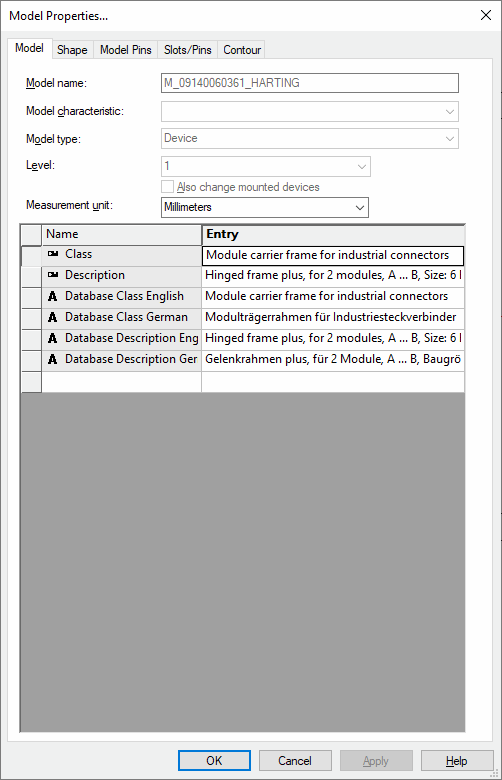
A dialog box appears in which you can display/modify the properties (its contents depend on the object selected):
|
Model |
|
|---|---|
|
Model name |
The model name is a unique identifier for the model.
The name can only be modified on creation of a new model. Once the model has been saved in the database, its name is fixed and cannot be modified. |
|
Model characteristic |
In order to be able to use a component for example in different mounting positions in the control panel, different characteristics can be defined for the selected model.
This characteristic is displayed behind the model name in the database tree (separated by the <...> characters). This characteristic is also displayed in the corresponding info column for characteristics in the model tree after saving.
See also: Characteristics for Models |
|
Model type |
Defines the model's type:
When selecting the Mount or Cable Duct type, the model's predefined shape is displayed on a model sheet and can be modified then. |
|
Level |
Defines the drawing level on which the model is placed. |
|
Measurement unit |
A unit of measure can be specified when editing a model. This is written to the database upon saving with the default value defined in the Settings. |
|
Name/Entry |
The bottom part of the dialog box contains the table for the modification of attributes (only possible if the Database Editor has been activated).
Model attributes can be set independent of device- or component attributes. This means, different attribute tables are displayed on the different pages of the Device Properties dialog box). |