
Component Wizard - Hose/Tube
The first step of the Component Wizard, the Identification dialog and the second step, the Properties dialog have already been modified.
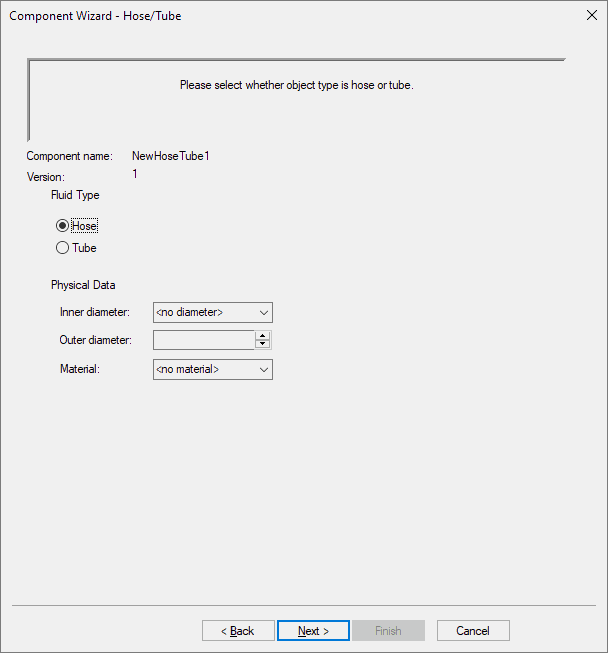
The third step (when creating a Hose/Tube) is to define the fluid type of the new component in the Hose/Tube dialog.
|
Component Wizard- Hose/Tube |
|
|---|---|
Fluid type |
|
|
Hose/Tube |
Select the desired fluid type: Hose or Tube. |
Physical Data |
|
|
Inner diameter |
It's possible to define an inner diameter for each hose/tube.
The selection list contains all inner diameters already defined in the database. Editing an inner diameter is described under Editing Hose/Tube Properties, Diameters and Materials in DBE. |
|
Outer diameter |
Defines the outer diameter of a hose/tube.
Calculation of the outer diameter is done as follows:
When no outer diameter is defined in the database, the cross-section (with wire insulation factor) is used.
The outer diameter is also used when calculating the filling degree of cable ducts, when displaying connections in 3D panel, with STEP export and with the COM methods netseg.GetOuterDiameter and job.GetOuterDiameter. |
|
Material |
Additional properties such as material can be defined for each tube or hose. The drop-down list contains all materials defined in the database under Format -> Wire Color and Hose/Tube Material.... |
The next step of creating a new hose/tube is also the last step. Creation of a new hose/tube can be completed in the Component Wizard's Complete dialog.