
Editing Hose/Tube Properties, Diameters and Materials in DBE
Editing Hose/Tube Properties
To modify or display the properties of hoses/tubes:
-
right-click on the desired hose/tube in the database and select the Edit command from the displayed context menu. Switch to the Hoses/Tubes tab in the displayed Component Properties dialog box.
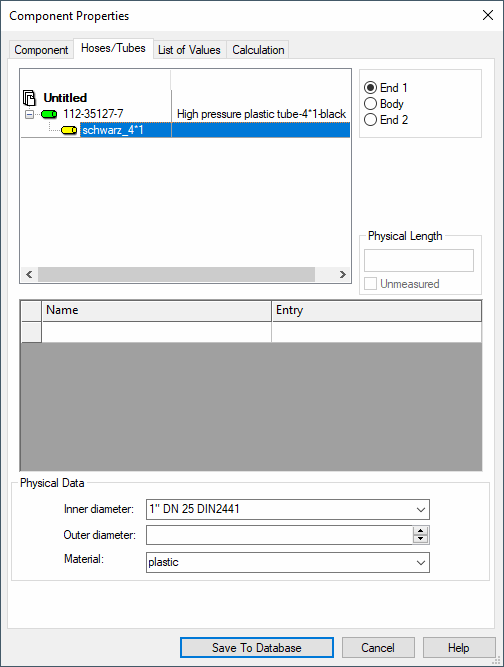
Editing Hose/Tube Material
Hose/tube material can only be changed in the Database Editor.
-
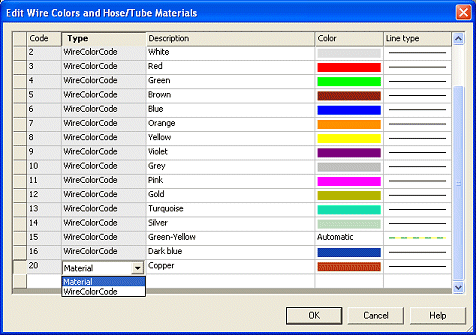
Start the Database Editor by selecting the Tools -> Start Database Editor command from the main menu bar. Then select the Format -> Wire Colors and Hose/Tube Materials... command from the main menu bar.
The following dialog box appears:
-
Click in the Type field to display a drop-down list containing the different types, Material and WireColorCode. Select Material to edit the material of a hose/tube.
To delete an existing type, right-click in the left (gray) box within the table and select the Delete command from the displayed context menu.
Clicking on the column headers sorts the corresponding columns ascendingly/descendingly.
Editing Hose/Tube Diameter
Hose/tube diameters can only be edited in Database Editor mode.
To display or modify the diameter:
-
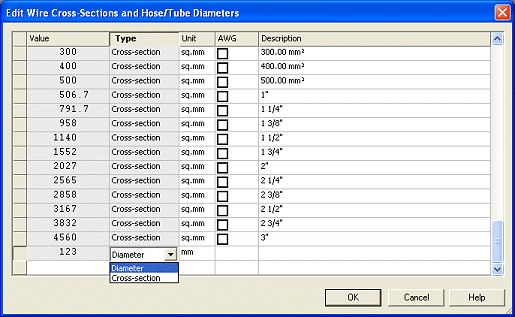
start the Database Editor and select the Format -> Wire Cross-Sections and Hose/Tube Diameters... command from the main menu bar.
The following dialog box appears:
-
Click in the Type field to display a drop-down list containing the different types, Diameter and Cross-section.
-
Select Diameter to edit the diameter of a hose/tube.
To delete an existing type, right-click in the left (gray) box within the table and select the Delete command from the displayed context menu.
Clicking on the column headers sorts the corresponding columns ascendingly/descendingly.