
Edit Wire Colors and Hose/Tube Materials
Wire colors and a hose's/tube's material can only be modified in Database Editor mode (see Database Editor).
Enter Database mode by selecting the Start Database Editor command on the Tools Menu on the Main Menu Bar. In DBE mode, select Format->Wire Colors and Hose/Tube Materials... on the Main Menu Bar.
The following dialog box will be displayed:
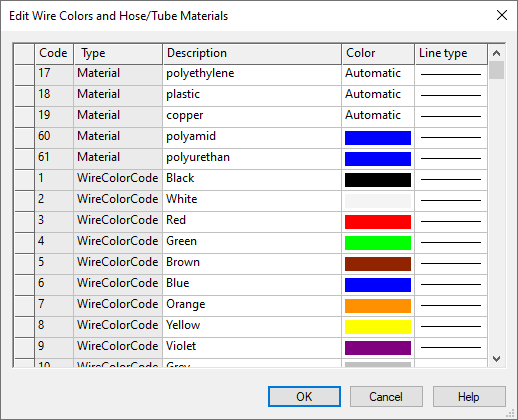
|
Edit Wire Colors and Hose/Tube Materials |
|
|---|---|
|
Code |
To add additional wire colors or hose/tube materials, select the empty Code field in the last line and type in the new entry in the field. |
|
Type |
A drop-down list displays the different types: WireColorCode and Material.
To delete an existing type, right-click in the left gray column of the table and select the Delete command from the displayed context menu. |
|
Description |
Is the descriptive text displayed in lists and drop-down menus. |
|
Color |
Defines the color to be used for wires and hoses/tubes. 256 colors are available for selection. Select the Color field to display a drop-down list box, containing all of the colors that are available. |
|
Line type |
Defines the line style to be used for wires and hoses/tubes. Select the Line type field to display a drop-down list box, containing all of the line styles that are available. |
To delete a wire color or hose/tube material, right-click on the left (gray) column of the table, adjacent to the color code to be deleted, and select the Delete... command from the displayed context menu.