
Variants/Options

|
Variants/Options |
|
|---|---|
Project Setting |
|
|
Separator for variant texts |
Is the character placed between variant name and component code when displaying variant text by means of the Device Properties or the Insert Variant Text command. |
|
Unique Names for Variants/Options |
E3.series checks whether the assigned option names are unique. When this option is not checked, the combination of folder and option name determines the uniqueness.
Variants or options whose names are not unique, are listed in the Output Window's Results tab. |
|
Create New Alias |
Aliases are a summary of different variant and option combinations with one name. Aliases are used to recall recurring boolean expressions by name. |
|
Alias name |
Please define a corresponding name (i.e. alias) for the desired variant or option combination.
See also: Creating and managing variants & options |
|
Boolean expression |
Select the corresponding buttons to define a Boolean expression. These buttons are available only when previously having selected a group under Select Groups.
NoteOnly already existing variants / options can be used
Boolean operators are conjunctions or expressions such as AND (conjunction), OR (disjunction), NOT (negation).
The following syntax operators are allowed:
Basic forms of boolean conjunctions:
Different operators on the same level must be differentiate by brackets, except from NOT operators.
ExamplesOPT-1 & ( OPT-2 | OPT-3 ) OPT-4 & !OPT-5
The boolean expression used for the alias can afterwards be assigned to the selected object(s). |
|
Does not exist/Only exists |
Here, a global state Does not exist or Only exists can be defined for an alias.
When this alias is defined on a device it will or won't be displayed corresponding to the appropriate variant constellations within the working area.
Note
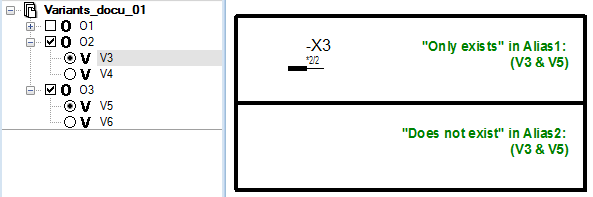
ExampleFor connector -X3 the state Only exists in Alias 1 (V3 & V5) is defined.
For connector -X4 the state Does not exist in Alias 2 (V3 & V5) is defined.
Variant V3 is active/Variant V5 is active:
Variant V3 is inactive/Variant V5 is active:
|


To delete an alias right-click in the table's left column and select the Delete command from the displayed context menu.