Defining Structure Rules and Dependencies
Structure Template File
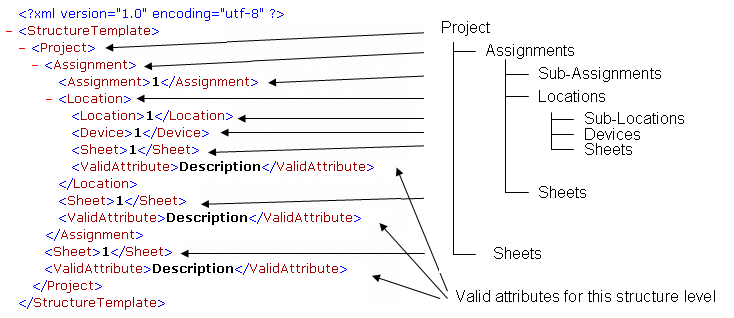
To change the configuration of the project tree, a structure template file (XML file) can be selected in the Project Properties... dialog. The files are generated in XML format and externally stored. See example:
<?xml version="1.0" encoding="utf-8"?>
<StructureTemplate>
</StructureTemplate>
The Select
File
dialog appears when pressing the
selection button  and the structure templates already available can
be selected. Examples are stored in the installation directory under:
and the structure templates already available can
be selected. Examples are stored in the installation directory under:
\\Users\Public\Documents\Zuken\E3.series_<version>\structure_templates\
After selecting a structure, the tree display has to be defined in the Tree Control Properties (see Defining Properties).
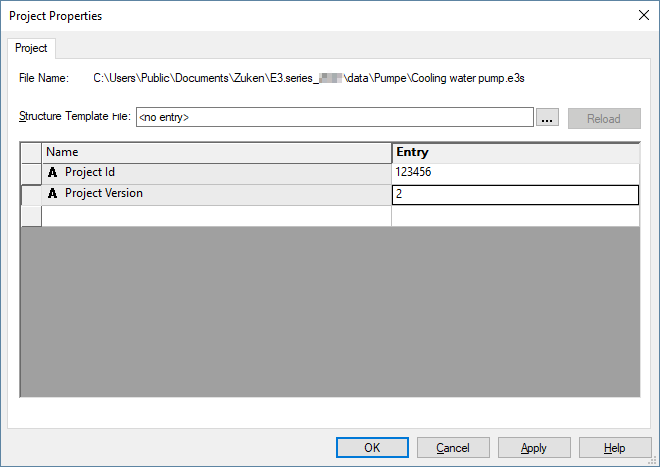
When loading a structure template into an existing project, some devices and sheets might collide, if their current attributes do not correspond to the new structure definition.
In this case, the system displays a corresponding message and the affected objects are listed in the Results window. The user can then decide whether to use the new structure.
The current structure can also be saved in the template file and consequently used as default for a new project.
Note Regarding Existing Projects
Existing projects are automatically converted to a "flat structure", i.e. the sheets and devices are loaded in the uppermost level of the project. This can also be done by removing the structure template file from the corresponding option in the Project Properties.
-
The structure can be modified using the Structure Template File... option in the Project Properties... dialog after opening the project.
-
The "flat" structure can be loaded using the structure template file Classic.xml.
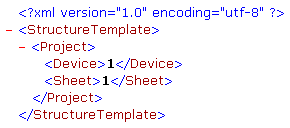
Example
Possible Key Words in Structure Template File
The elements always exist of a pair:
-
<start> and </end> element
List of elements (tags)
|
Start tag |
Value |
End tag |
Description |
|---|---|---|---|
|
<StructureTemplate> |
|
</StructureTemplate> |
File extension |
|
<Project> |
|
</Project> |
Project level (top-most level) |
|
<Assignment> |
1 |
</Assignment> |
Higher level assignment |
|
<Location> |
1 |
</Location> |
Location |
|
<Attribute Name="xyz"> |
|
</Attribute> |
Any attribute with 'device' or 'sheet' as owner |
|
<Device> |
1 |
</Device> |
Device object |
|
<Sheet> |
1 |
</Sheet> |
Sheet object or OLE document |
|
<ValidAttribute> |
att1 |
</ValidAttribute> |
Valid attribute of a structure node |
Example: Structure Template