
Displaying Terminal Plan Type
Display of the Terminal Type using a Graphic Symbol
For each terminal type (disconnect terminal, analog terminal, transformer terminal, slide terminal etc.) it is possible to define an own terminal plan table symbol in the component database.
This table symbol is then used in the terminal plan instead of the default symbol. This makes sense, if e.g. special graphic (e.g. diode terminal) or special information for the terminals (e.g. multi-level terminals) is displayed on the terminal plan.
Concerning terminals that have several terminal plan rows (e.g. double-level terminals) it is important to define, whether this symbol displays the complete terminal or whether this symbol represents only one terminal plan row.
When using the complete terminal it should be considered that the text's order in the symbol and the pin's order of the terminal must correspond. The first text of a text type in the terminal plan symbol is assigned the first terminal pin (see Note below).
Example: Table Symbol
For creating a new terminal plan table symbol an existing table symbol can easily be copied and changed.
Depending on the terminal type to be described (diode terminal, multi-level terminal, double-level terminal, etc.) the graphic can be modified and other text types can be placed (see also Terminal Plan Table Symbol).

Note
-
The placement coordinate's origin must be "0" when creating the terminal plan table symbol. Regarding horizontal table symbols, the symbol's minimum Y coordinate must be 0; regarding vertical table symbols, the symbol's minimum X coordinate must be 0.
-
The default table symbol must match the sheet format (to avoid the symbol overlapping the sheet header).
Assigning a Terminal in DBE Mode
After completion, this new terminal plan table symbol can be assigned the corresponding terminal component: Through the terminal's Component Properties..., all possible table symbols are displayed in the Table symbol drop-down list.
The selected table symbol is now used in the terminal plan.
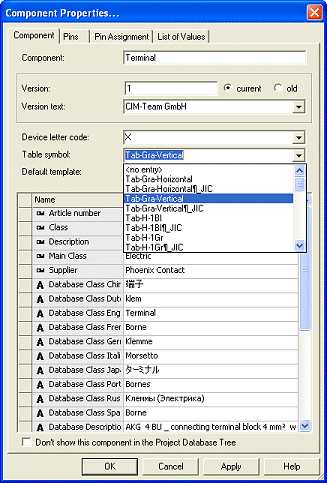
Assigning a Terminal in Project Mode
In Project Mode it is also possible to define a terminal plan table symbol for certain devices.
Using the Device Properties... in the Device tab, all possible table symbols are displayed in the Table symbol drop-down list.
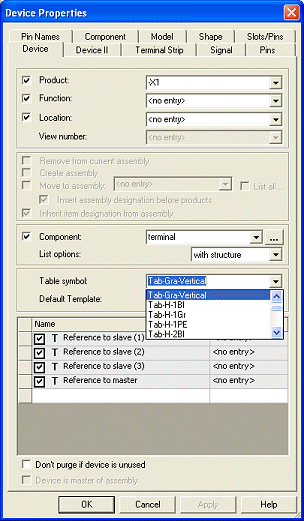
Thus it is possible to dynamically define different terminal configurations for the terminal plan.
Note
In Database Editor it can be defined on the table symbol, whether all connections should be displayed at the symbol, or whether a row should be created for each pin.
Therefor in Symbol Properties... it is possible to define through the Symbol represents option either connection or device.
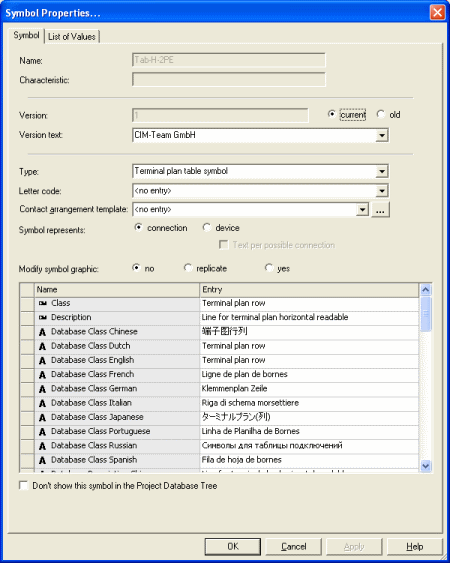
When connection is checked, for each pin a table symbol is placed (with consideration of the settings).
When device is checked, for each single terminal a symbol is placed. In this case, several texts for displaying plan information can be displayed.
The assignment of the texts to terminal pins takes place in sequence. This means, that the nth text for the pin name displays the pin name of the nth pin.
Therefore it is possible to display separators and end plates of a terminal strip in the terminal plan: These elements should be defined as terminals and should be inserted in the terminal strip. When a terminal plan table symbol is defined for these devices, this is correspondingly displayed in the terminal plan.
Text per possible connection
With one row symbol per device in the terminal plan (i.e. one row symbol describes a complete terminal), it is possible to output all signal-equivalent pins. This can be specified by checking this option.
When a panel model is defined, this option controls, which text copy is to be used for a single pin. The connections are assigned to the texts, that are used for the symbol, depending on the max. possibilities of connections of the pin ("maximum wire count").
When the terminal is also wired in the panel, the appropriate text can be assigned to the terminal symbol for equivalent pins. When the terminal is not yet wired, the connections are assigned to the appropriate texts "one after the other".
When the terminal doesn't contain a panel model, the system assumes that the pin can be connected only once.
Regarding jumper pins, there is a special case: When the terminal plan is generated with jumpers, jumper pins are ignored. Otherwise they are handled as described above.