
Components and Symbols with Bus Pins
General
Bus pins are pins, which represent several physical component pins. The following advantages result from the use of bus pins:
-
The circuit diagram becomes clearer.
-
The connection to several pins is easier.
-
The individual symbols (pin) of a component do not have to be placed individually (if single pins were defined as symbols).
Defining Bus Pins in Database
In order to define a bus pin in the database, activate a pin's context menu (when editing a symbol in the database) and select the command >Node Properties. Then check the option Represents more than one pin (bus pin).
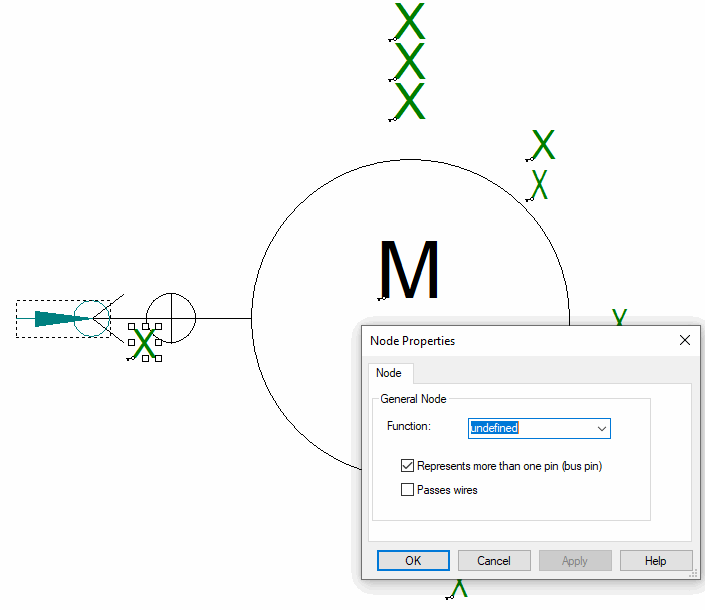
Save the new bus pin symbol to the database.
Using Bus Pins in Components in Database
This symbol is to be assigned to a device in the database.
To do so, create a New Component and place the already created symbol on the component sheet.
Right-click now on the component sheet and select the command Pin Assignment on the displayed context menu; or right-click on the component sheet and select the command Edit -> Pin/Conductor Assignment -> Pins on the main menu bar.
The following dialog will be displayed:
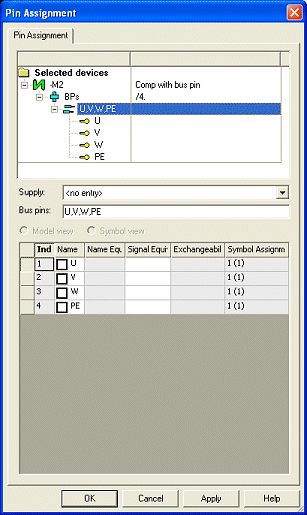
This dialog serves for setting the names of the bus pins. Subsequently, you can define mating connectors in the dialog Component Properties -> Pins.
Save the bus-pin component to the database.
Using Bus Pins in Project
If a connector (in the example 4-pole) was defined as mating connector in the database and assigned to the component, the defined 4-pole connector is created automatically:
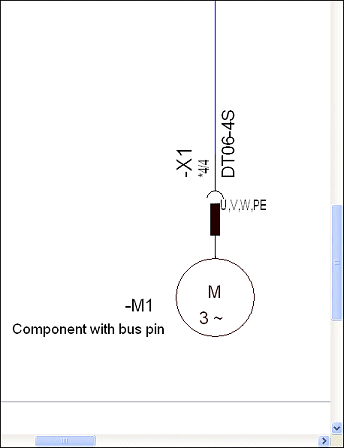
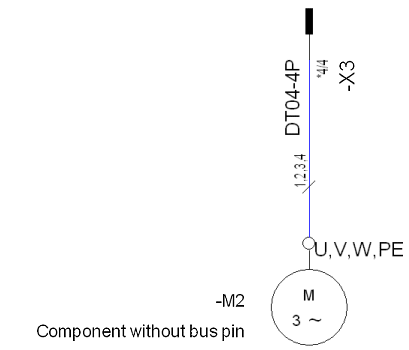
If the conductors of a cable or wires are directly connected to the component pins, no mating connector is defined for the bus pin. In the example, 4 conductors of a cable are placed between the connector -X3 and 4 pins of the bus-pin component -M2.

Note
No devices with bus pins without component assignment must occur in the project. A deletion of the component assignment is rejected with the following message
W - Can't deassign component definition from device '-M3' because of bus pins. Component not changed.
Remarks on the command 'Update in Project'
In the following cases, the command' Update in Project ' on a component is rejected for bus pins with mating-connector definition:
-
Plugged-in bus pin must be deleted
Remark: even if all pins of the bus disappear; since otherwise an update at the mating connector becomes necessary.
-
Number of pins at the 'plugged-in' bus does not correspond to the number of pins of the mating connector.
-
'Normally plugged-in' pins become a bus pin and vice versa.