
Editing Hierarchical Ports
General
Hierarchical ports are used as interface between the hierarchical block's pins and the circuit part represented by the block. This means connections are lead from the hierarchical circuit diagram through hierarchical ports to "to the outside".
A hierarchical interface always exists of two hierarchical symbols:
-
Hierarchical port symbol on the hierarchical block to define the hierarchical block's inputs and outputs.
-
Hierarchical port symbol on the hierarchical block's sheet to continue signal run in the circuit diagram.
Example
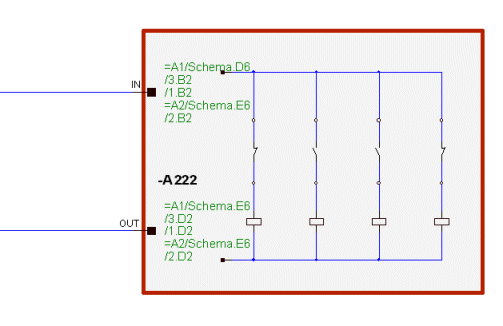
Hierarchical Port Symbols
The definition of the signals routed between the different ports (their subcircuits) is an important factor during design of a hierarchical circuit diagram.
Hierarchical port symbols are used to refer between the signals on the hierarchical block and the signals on the hierarchical circuit diagram.
Referencing between the hierarchical ports is accomplished by means of a unique designation (similar to sheet references).
Placing Hierarchical Ports on Hierarchical Blocks
Hierarchical ports for the hierarchical block and hierarchical circuit diagram are loaded as symbols from the database.
To add a hierarchical port, select one of the following options:
-
In the Misc tree view of the Database Window, right-click on the desired port symbol in the Hierarchical Port folder and select Place from the displayed context menu or
-
simply drag and drop the port symbol from the tree view onto the edge of an already placed hierarchical block.
A unique name for the hierarchical port symbol must be specified in the displayed dialog box:
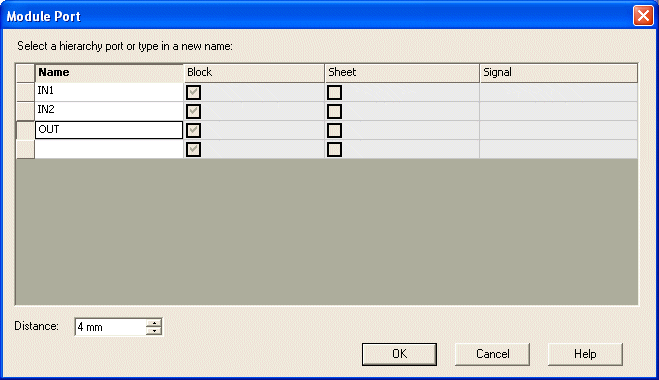
To place several hierarchical ports simultaneously, the desired Distance between the symbols can be defined.
Status Flag on Hierarchical Block
E3.cable immediately identifies an incomplete definition of a hierarchical port and reports it as a status flag on the block (for example sheet -3).
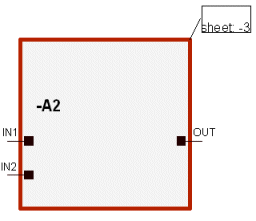
Moving and Deleting Hierarchical Ports
By selecting the Edit -> Move (Rotate) command from the Main Menu bar or in the context menu, hierarchical port symbols can be moved about freely or along the edge of a hierarchical block. When changing to the other side of the block, the symbol will be rotated automatically.
Hierarchical ports are deleted by selecting Edit -> Delete on the Main Menu bar or on the context menu.
Placing Hierarchical Ports on Hierarchical Sheets
To complete the hierarchical port interfaces, a hierarchical port must be placed as mating connector on one of the hierarchical block's sheets for each hierarchical port placed on the block.
To do so, use the
command on the hierarchical block's context menu and select once again the hierarchical port symbol from the Database window to place it.
The following dialog displays all hierarchical ports placed on the parent block and their designations for selection.
After placement, the cross-reference texts are automatically entered at both port symbols of the interface and the status flag on the block is updated.
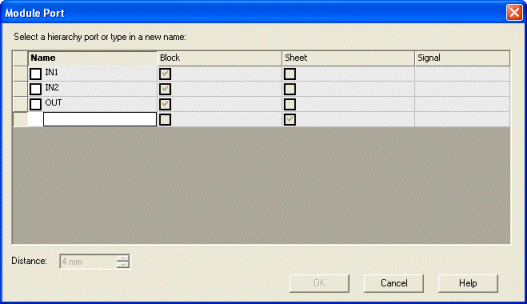
Activate the desired hierarchical ports in the above displayed dialog and select OK. After placement, the cross-reference texts are automatically entered at both port symbols of the interface and the status flag on the block disappears.
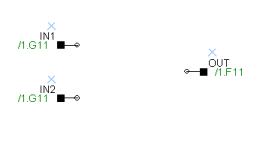
The text nodes of a hierarchical port have the following meaning:
|
Text type |
Meaning |
|---|---|
|
Signal name (text type #7) |
Signal name on the hierarchical port (e.g. OA1) |
|
Hierarchical port name (text type #303) |
Unique designation of the hierarchical port (e.g. OUT) |
Connecting Hierarchical Blocks
The circuit diagram can now be created as normally. Single connections that are routed to the hierarchical block must be connected to the port symbols. In doing so, the signal name is entered on the port symbols of the hierarchical block and the hierarchical sheets. Conductors and wires are routed and transferred through hierarchical ports.
The signal definition on the hierarchical ports can be modified in the Connection Properties... dialog box. A change of the signal, conductor or wire definition applies to the whole interface (i.e. both port symbols).
The signal definition can also be modified through the Signal tab of the Symbol Properties... dialog. The dialog displays all selected hierarchical ports or all hierarchical ports of the selected blocks.
Using Terminals with Hierarchical Ports
It's allowed to place hierarchical ports or hierarchical connectors onto hierarchical blocks. In some cases, terminal connections are also used between those elements.
In this case terminals can be placed on the upper or lower hierarchical level and can be connected with each other afterwards. This may clearly arrange the documentation.