
Symbol Properties - Graphic
To display/modify the graphic properties of a dynamic symbol,
-
with the required device selected in a Drawing Window, select Format->Symbol Properties... from the Main Menu bar, or
-
right-click on a dynamic symbol in the drawing and select the Symbol Properties... command from the displayed context menu and select the Graphic tab. To select more than one symbol for modification, hold down the shift key, then left-click on each of the desired symbols and right-click on the final symbol to display the context menu.
-
Or right-click on the respective dynamic symbol in the Device tree view and select the Symbol Properties... command from the displayed context menu and select the Graphic tab.
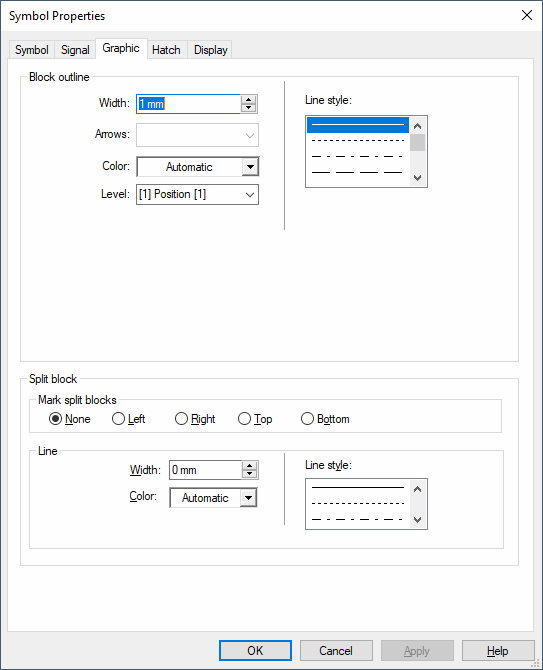
The following dialog box will be displayed:
|
Graphic |
|
|---|---|
Block outlineThis section header is only displayed for blocks! |
|
|
Width |
Defines the line width (thickness) of the graphic.
NoteLines with a width of 0 mm are displayed and printed! |
|
Arrows |
This field is inactive with dynamic symbols. |
|
Colour |
Defines the color of graphic elements.
If 'Automatic' is selected, the color defined in the Color Definitions dialog box will be used. |
|
Level |
Defines the drawing level on which the graphic elements will be placed.
|
|
Line style |
Defines the line style to be used. |
Split BlockThis section of the dialog is only displayed for blocks! |
|
Mark split blocks |
|
|
None |
This option is checked by default, provided that nothing different is defined in Settings - Placement - Block.
No special display for split blocks. |
|
Left/Right/Top/Bottom |
The marking for split blocks is displayed on the block's left / right / top / bottom side. |
Line |
|
|
Width |
Defines the line width. |
|
Color |
Defines the color used for the graphic line.
When 'Automatic' is selected, the color that is defined in the Color Definitions dialog is used. |
|
Line style |
Defines the line style to be used. Possible values are all line styles defined in the FONTS.dat file.
Inactive variants/options are displayed according to the FONTS.dat file definition only with the following line styles:
With other line styles, all lines of inactive variants/options, such as break-up edges and outlines, are displayed as continuous lines gr |
