
Placement - Import
|
Import |
|
|---|---|
Merge Sheet References Options |
|
|
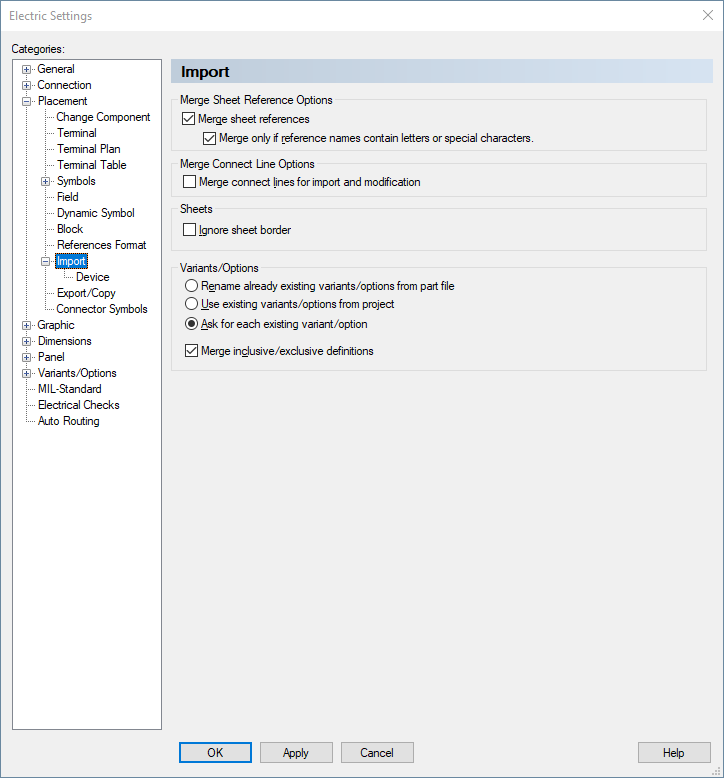
Merge sheet references |
This option is checked, by default. With this option checked, it is possible to control how sheet references are merged using the Merge only references with alphanumeric index part option.
When this option is unchecked, sheet references are not merged. |
|
Merge only references with alphanumeric index part |
When this option is checked, references are only merged when the reference name contains an alphanumeric part in its index part.
By default, this option is checked.
When this option in unchecked, reference names are merged independent on how the index part of a reference name looks like. |
Merge Connect Line Options |
|
|
Merge connect lines for import and modification |
This option defines whether existing connect lines are connected with those imported or whether new connect lines are created. |
Sheets |
|
|
When this option is checked when importing a subcircuit, the user can decide where the subcircuit is placed, on which sheet and at which position on the sheet in the project.
With the Import Drawing Options dialog the command Ignore sheet border can be defined from case to case.
Note
|
|
Variants/OptionsThis section is used to define how to handle already existing variants/options in the project and the subcircuit. |
|
|
Rename already existing variants/options from part file |
Already existing variants/options are renamed in the part file. |
|
Use existing variants/options from project |
Existing variants/options from the project are used when importing. |
|
Ask for each existing variant/option |
Each variant/option already existing is queried and a corresponding message is displayed. |
|
Merge inclusive/exclusive definitions |
When this option is checked, inclusive/exclusive definitions (see Creating and Managing Packages and Configurations) are added to the project when importing.
Inclusive/exclusive definitions already available in the project remain existing.
When this option is unchecked, inclusive/exclusive definitions are not added to the project when importing. |