
Renaming a Multi-User Project
This functionality is only available, if a E3.enterprise license is present!
To open the dialog for renaming a multi-user project,
-
select File -> Rename Multi-user Project... from the Main Menu bar.
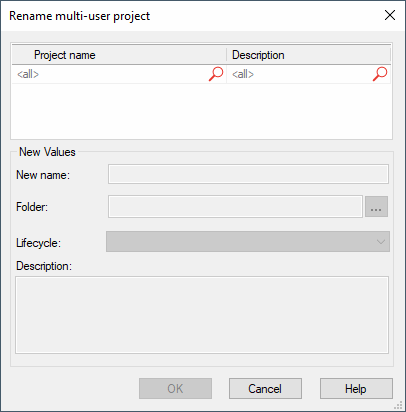
The following dialog box will be displayed:
|
Rename multi-user project |
|
|---|---|
|
Project name |
The project to rename can be selected from the Project name field.
The project structure is displayed containing all existing folders and sub-folders (created in MuAdminTool) and all projects available.
The icon in front of the projects represent the project's status and access authorization. For more information, please click here.
Define a filter term to only display projects with certain names. |
|
Description |
Displays the description of the selected project to be renamed.
Define a filter term to only display projects with certain descriptions. |
New Values |
|
|
New name |
The new name for the multi-user project can be defined.
Following file names are possible as project names:
|
|
Lifecycle |
It is possible to change the lifecycle of a project in this dialog as well. Requirement: the project must be closed and is not accessed by any other user. The user must have the permission to edit the project.
The new lifecyle / project state is defined in this field. This might be necessary, when a lifecycle has finished, i.e. the project can be moved forward to the next phase, or must be 'downgraded'.
Only those lifecycles are listed that are defined as valid lifecycle "target" in MUAdminTool.
When the user does not have the permission to write in a project in a certain lifecycle (is assigned in MUAdminTool), the project cannot be selected at all.
NoteAfter changing the lifecycle, new permissions are valid, that may result in the project no longer being able to be edited.
Users of another group can edit it now and change its lifecycle. |
|
Description |
The multi-user project can be described in detail. The description can be changed, if required. |