
Swap Symbol
It is possible to directly exchange a symbol by any other one, i.e. also unplaced symbol, within a device.
Thus, the following is possible:
-
Connector pins can be exchanged.
-
Inputs can be exchanged by inputs and outputs can be exchanged by inputs with PLC components.
-
Contacts can be exchanged with relays.
Requisite: Symbols must be placed and assigned!
To exchange a symbol right-click on the desired symbol on the sheet and select the Swap symbol command from the displayed context menu.
The following dialog box appears:
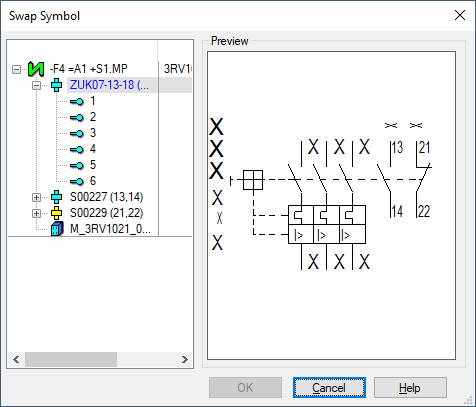
The first selected symbol is highlighted in blue in the dialog and all other symbols of the device are displayed in the tree view on the left. Select the symbol to be used for the exchange. Any symbol can be used for the exchange, i.e. a "symbol A with 2 pins" can also be exchanged by a "symbol B with 5 pins". After closing the dialog with OK, the existing symbol is exchanged by the one selected in the dialog. When the new symbol is already placed, this is replaced by the symbol selected in the previous dialog.
The conductors and signals are correspondingly reconnected to the new pins. The symbol swap is also valid for all views, as well as pin views. Thus, all connections already done remain consistent, also regarding the views.
Regarding pin groups, only the pins within the group are swapped, not the symbols. Regarding connectors, only the single pins are swapped. When a connector group is selected and the second selection is also a group, all pins within the group are exchanged. The assignment of the pins of which the conductors or signals are exchanged, is done through the pin order at the symbol. Unassigned pins are also exchanged, but the conductors and the signal remain existing.
A symbol swap can also be done using the following commands:
-
Using the Text Properties or F2 on pin names any symbol, i.e. also an already placed symbol of the device, can be exchanged.
-
When the target symbol is placed, the exchange occurs on the symbol and its symbol views.
Example:
-
The (placed) symbol to be edit 1 and the (placed) target symbol 2 shall be exchanged.
-
The symbol to be edit 1 is manually renamed to 2.
The symbol views of the symbols to be edit are automatically renamed to 2. -
The target symbol is automatically renamed to 1 by symbol exchange.
-
-
When the target symbol is not placed, renaming occurs without symbol exchange.
-
A symbol swap is not possible with
-
symbols of terminal strip views
-
symbols of pin groups (see also Display several connectors in one symbol)
-
symbols without device assignment
-
symbols of a pin view