
Import DDS-C Schematic
To import a DDS-C schematic (design file),
-
start E3.cable and
-
select the File -> Import -> Schematic... -> DDS-C/Schematic... command from the Main Menu bar and
-
complete the following dialog box:
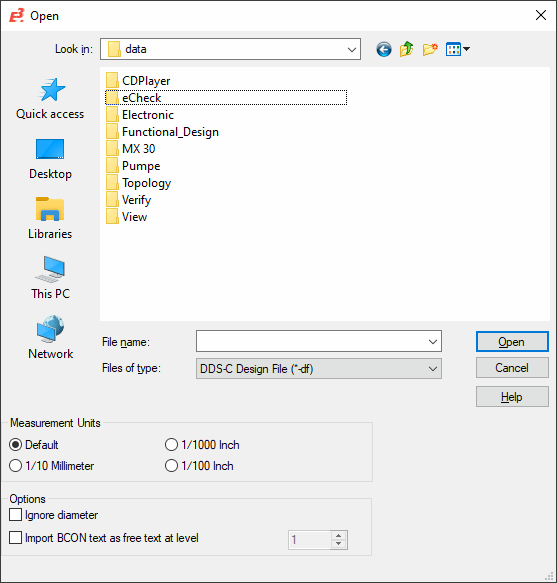
The system always starts the dialog in the directory defined in the Settings' Default Directory page.
When converting from DDS-C to E3.series, both fonts available in DDS-C are converted:
-
The DDS-C fonts are written in the designfile (section CBFONT). If these are CHRTAB fonts, the name remains empty.
-
These fonts, if available, are then assigned to the texts in E3.series. If not, the defined default font is used.
DDS-C groups are transferred as fields. To attain shortening within the fields, IEC 81346 has to be activated (Tools -> Settings -> Placement).
Note
-
When importing DDS-C projects, the option which permits net loops in E3.series projects is checked.
-
When importing DDS-C text type #19, the system differentiates between signal references and normal symbols. Concerning normal symbols, DDS-C text type #19 is converted to E3.series text type #1006.
-
The text type #10 on signal cross-references (SRC/N and DST/N) is adopted as the index in the sheet references with DDSC Import.
-
A block with symbol type 5 from DDS-C is converted to symbol type 2 (normal symbol) in E3.series.
-
Groups from DDS-C are transferred as fields. To shorten within the fields, IEC 81346 has to be activated (Tools -> Settings... -> Placement).
|
Open |
|
|---|---|
|
Look in |
Allows you to select the drive and folder from where you want to load the file. |
|
File name |
Enter a name for the file. |
|
Files of type |
The default type is DDS-C Design File (*.df). |
Measurement Units |
|
|
Default |
Select this option to use the basic setting 1/10 mm or, if a template file exists, the unit used in the template file. |
|
1/10 Millimeter 1/1000 Inch 1/100 Inch |
On the basis of resolution and size of the screen, the schematic size (in pixels) is converted to 1/10mm, 1/1000 Inch or 1/100 Inch. |
Options |
|
|
Ignore diameter |
If this option is activated, all diameters of DDS-C (symbol graphics, graphics, connect lines) are set to 1/10 mm. |
|
Import BCON text as free text at level |
Using this option, BCON texts are imported from the designfile as free texts on the defined level.
When this option is checked, E3.series "BCON" signal names are defined with a height of 0 (in the Settings) and are no longer displayed.
NoteLevels can be defined from 1-256 (see also: Levels selection) |