
Device Properties - Device II
To display/modify the properties,
-
select the desired device in the drawing and select the Format -> Device Properties... command from the Main menu bar. Switch to the Device II tab, or
-
right-click on the desired device in the Project window's Device tree and select the Device Properties command from the displayed context menu. Switch to the Device II tab. Or
-
right-click on the desired device in the drawing and select the Device Properties command from the displayed context menu. Switch to the Device II tab.
The following dialog box appears:
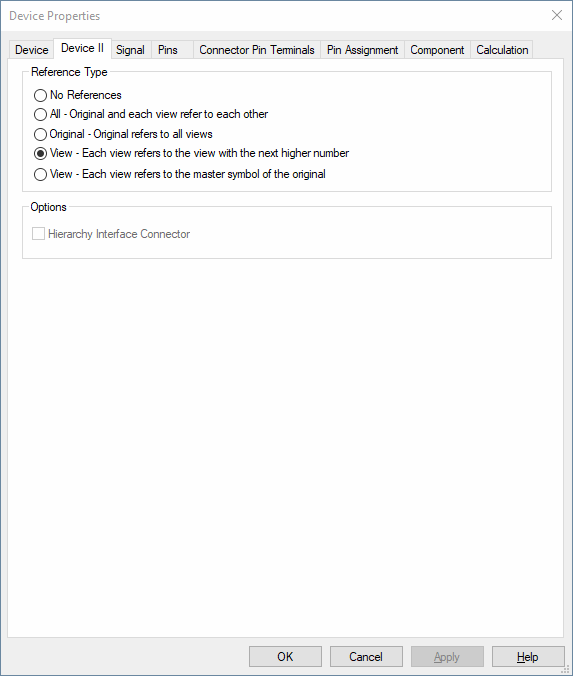
Reference Type |
|
|
The corresponding text types 'Reference between device view' and 'Reference between pin views' are not displayed. |
|
|
All - Original and each view refer to each other |
Check this option so that the original and each view refer to each other. Each symbol displays a reference to all symbols that contain the displayed pins, independent on the original or view number. |
|
Original - Original refers to all views |
Check this option so that the original refers to all views. That means, in this case the view symbols also refer back to the original representing the corresponding pins. |
|
View - Each view refers to the view with the next higher number |
Check this option so that each view refers to the view with the next higher number. I.e. the original refers to view #1, the texts of this view refer to the corresponding symbols of the next higher view #2. |
|
View - Each view refers to the master symbol of the original |
Check this option so that each view refers to the master symbol of the original device.
The cross-reference must be defined beforehand on the device symbol in the Database Editor with the Text type#1099 - Reference between device views. |
Options |
|
|
Hierarchy Interface Connector |
Connector views can either be placed onto a hierarchical block or within the hierarchical instance. Connectors that are placed within the hierarchical instance are no Hierarchy Interface Connectors.
These type of connectors can be changed into Hierarchy Interface Connectors afterwards through this option and be placed onto a hierarchical block afterwards.
Connectors, that are already plugged at the connector side cannot be defined as hierarchy interface connectors.
See also: Hierarchical Design |
Variants/Options
This part of the dialog is only displayed if variants/options have been defined in the project and the Standard Mode is active. |
|
|
Variants to change for |
Selection of the variants you want to change in the dialog. Before making modifications, the desired variant has to be defined. |
|
Create new instance |
A new instance of the component is created for the variant. |
|
Set changes to default |
This button resets changes made to the set variant. |