
Multiple Nodes
Use the toolbar button  to place several nodes simultaneously.
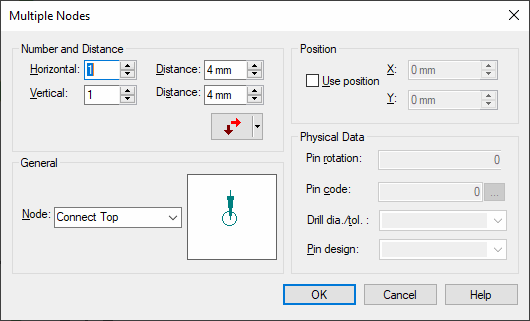
The following dialog box is displayed:
|
Multiple Nodes |
|
|---|---|
|
Number & Distance |
A number of connection nodes and the distances between them can be specified for horizontal and vertical direction. The distance must be a multiple of the currently active working grid.
Different sorting sequences can be selected from the drop-down menu
ExampleHorizontal=5; Distance 10mm Vertical=3; Distance 30mm
Node=ALL
|
General |
|
|
Node |
Selection of a node template defined in Database Editor mode for multiple placement.
This option defines the direction for placement of the nodes: right, left, top, bottom.
The red arrow defines the first direction, the crimson arrow defines the second direction. |
Position |
|
|
Use position |
X: Defines the start coordinate in X. Y: Defines the start coordinate in Y. |
Physical Data (This option is only active when defining a model.) |
|
|
Pin rotation |
Pin rotation (for pin design) |
|
Pin code |
Pin code (defines the type of the pin) |
|
... |
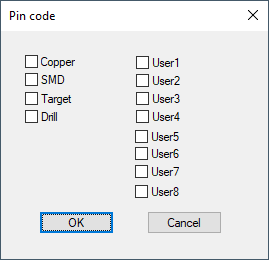
Displays the pin code dialog box where user-bits can individually be defined when activating the checkboxes.
NoteSMD pins should only have Pin Code=SMD (not Copper+SMD) as otherwise no film can be output which only has components plated without SMDs. This film is for example needed to generate masks for vias and test points, if the reflow method is used on both sides of the backplane. |
|
Drill dia./tol. |
Drill diameter / tolerance (refers to drill definition) |
|
Pin design |
Pin shape (refers to pin design definition) |
 . The red arrow indicates the first direction, the dark arrow the second direction.
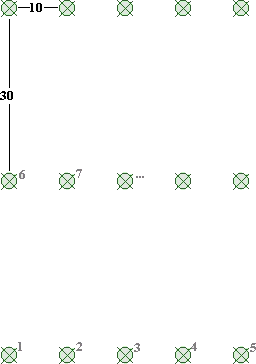
After pressing the OK button the nodes are displayed and can be placed on the desired position.
When doing so, the system checks whether these nodes fit to the sheet and a message will be displayed if necessary.