
Text Type 'Sheet Reference'
It is possible, also with several signal cross-references, to individually define any position for each text. When more cross-reference texts are to be displayed than texts nodes are available, these are displayed in columns.
When one text type was defined for the symbol in the database, all cross-reference texts are displayed as multiline texts in the text type Sheet reference - #1037.
Example

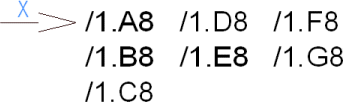
When several texts types of the type Sheet reference - #1037 are defined for a symbol in the database, each text type defines the start position for a column with cross-references. These cross-references are equally arranged for the text types.
Example
-
A symbol has 3 text types of the type Sheet reference defined
-
7 cross-references are output
-
the cross-reference texts 1, 2, 3 are displayed in the first text nodes
-
the cross-reference texts 4, 5, 6 are displayed in the second text nodes
-
the cross-reference text 7 is displayed in the third text nodes
-
The columns' position can already be defined for the symbol and it is still possible to (individually) move the columns later on.
Note
Any reference pin direction is possible, if the Sheet Reference text type is available.