
Expandable/Changeable Symbols in Project Mode
Symbols can be expandable and changeable and thus it is possible to stretch for example attribute templates as well as mounting rails. The symbol graphic can be replicated to display, for example, corrugated hoses and tubes etc..
When selecting a changeable or expandable graphic (i.e. the option yes was selected in the Symbol Properties dialog in DBE), eight edit points are offered for modification. These points are displayed along the symbol's space requirement. By dragging the symbol graphic the corresponding scale factor is counted by the system.
This scale factor is used on parts of the symbol (such as graphics, texts and pins). Furthermore, this factor always refers to the symbols origin. As opposite sides must keep their positions, the symbol origin may be moved by the system (depending on what position the symbol origin is defined in the database).
Restrictions regarding expandability:
-
If the symbol is rotated, all connected connect lines are treated as angular lines, i.e. only one line end is modified.
-
If a symbol is plugged in any way, it can no longer be expanded, i.e. no edit points are displayed.
If the replicate option was selected in the Symbol Properties in DBE mode, the complete symbol graphic is bound as free graphic to the symbol. Pins and texts are not changed.
Furthermore, scaling down the graphic is not possible, at least one element must be displayed. It is either possible to replicate vertically or horizontally. The symbol space requirement defines the preferred direction. It is not possible to replicate beyond the symbol's origin.
Modifying Symbols by Defining Lengths
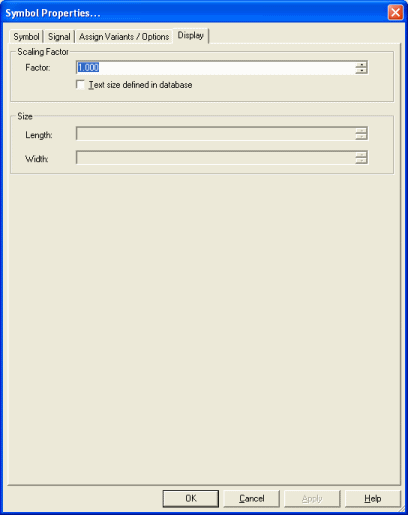
To define a length for horizontal or vertical scaling the Display tab can be used in the Symbol Properties dialog. In this dialog, the Length and Width are displayed and can be changed correspondingly.
Both options always refer to the location of the origin.
|
Display |
|
|---|---|
Scaling Factor |
|
|
Factor |
Displays the scale of the selected symbol.
Note
|
|
Text size defined in database |
Check this option to keep the text size when scaling. This option only effects the current change, i.e. depending on the option, the system determines the factor for the change currently to be executed, and texts are scaled by this factor, or not. |
Size |
|
|
Length |
The length depends on the horizontal scale (to the right).
Note
|
|
Width |
The width depends on the vertical scale (to the top).
NoteWith replicable symbols selected only one option is active as the symbol can either be scaled horizontally or vertically! The valid direction is defined by the space requirement which can be edited in DBE mode. |