
Placing Connectors on Hierarchical Blocks
Block connectors can be used as interface to schematic sheets. These can be placed a second time onto a hierarchical sheet. Furthermore, signals, cables, conductors and wires are passed through.
Placing Connectors in Hierarchies
It's also possible to place connectors onto a hierarchical block, thus cables, conductors and wires are passed through the hierarchical port connector.
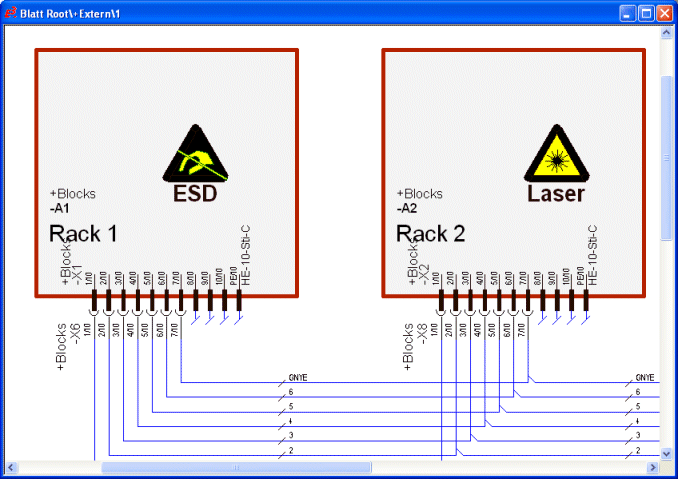
When defining a block as hierarchical block or a connector is placed onto a hierarchical block (outer level), the block connectors can also be placed within the hierarchical instance (inner level).
Device views of hierarchical connectors can be placed on all hierarchical instances.
Displaying Connectors in Tree View
Connectors that are placed on a hierarchical block or within a hierarchical instance are correspondingly displayed in the Device tree view:
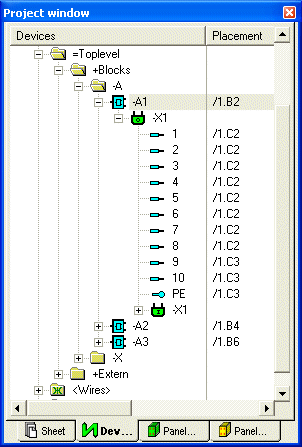
-
 Display of a connector within the hierarchical instance (inner level)
 -
 Display of a connector on a hierarchical block (outer level)
The original connector can only be placed on the block's edge of the hierarchical block. Furthermore views of the connector can either be placed on the block view's edge or freely on the sheet.
Within the hierarchical instance the original as well as views of the connector can only be placed freely on the sheet.
View numbers within the hierarchical instance are independent of those placed on the hierarchical block. This means, it's possible to place the original as well as two views (#2 and #3) within the hierarchical instance and also within the hierarchical instance the original and view number #3.
Defining & Placing Hierarchical Port Connectors
To place hierarchical port connectors of a view the following commands are available in the context menu of the tree view:
-
Place Outside Hierarchy
This command is available if the selected connector/connector pin or the selected connector/connector pin view is not yet placed out of the hierarchy instance.
-
Place Inside Hierarchy
This command is available if the selected connector/connector pin or the selected connector/connector pin view is not yet placed within the hierarchy instance.
With both commands the Place Outside Hierarchy or Place Inside Hierarchy dialog is displayed, in which the type of placement (either single pin or complete connector) and the desired connector symbol can be selected.
The view number is determined from the selected connector/connector view in the tree view and cannot be changed in the dialog.
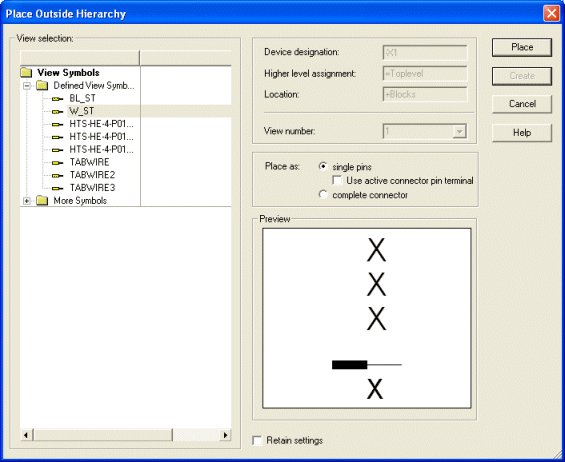
Connector views can either be placed onto a hierarchical block or within the hierarchical instance. Connectors that are placed within the hierarchical instance are no Hierarchy Interface Connectors.
These type of connectors can be changed into to Hierarchy Interface Connectors afterwards through the Device Properties -> Device II dialog and can be placed onto a hierarchical block afterwards:
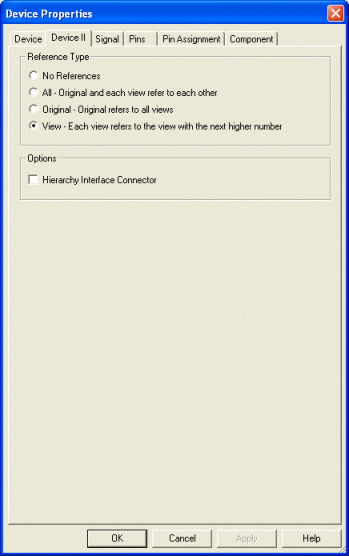
Connectors, that are already plugged at the connector side cannot be defined as hierarchy interface connectors.
Note
-
When placing connectors via Drag&Drop from within the tree view, the first possible command is executed.
Plugging & Placing Hierarchical Port Connectors
Regardless of whether placed on the block's edge or freely (as a view), a mating connector can be plugged to the connector side. Within the hierarchy instance connectors can only connected to the connection side, regardless of whether the original or a view is concerned.