
What is Hierarchical Design?
A hierarchical design enables a construction in desired levels. Therefor projects can be nested in any way.
Hierarchical blocks may contain sheets on which circuit diagrams, panel sheets etc. are displayed.
See example:
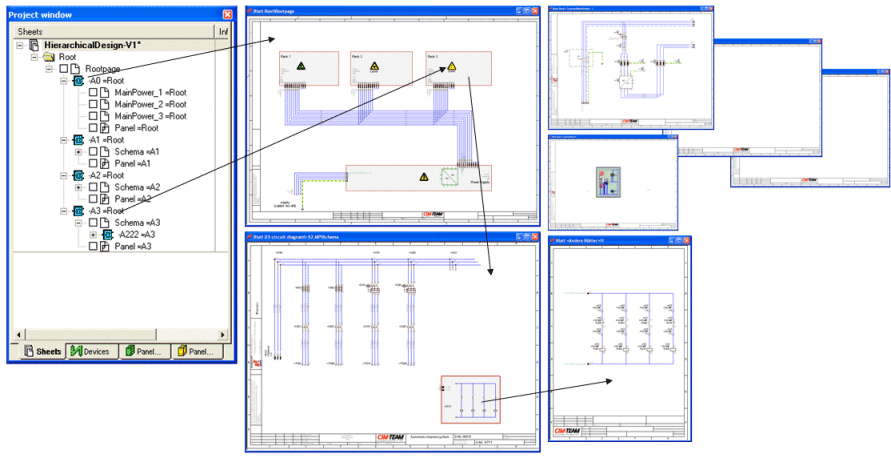
When working with hierarchies it's also possible to change the level of detail afterwards. When starting a project or part project in the lowest level and when additionally adding an upper level during development, this is called a Bottom Up Design.
When in turn, starting with the upper level and jumped into hierarchies in the course of development, it is called Top Down Design. Any type of combination is also possible. Part project, i.e. one or several sheets can easily be moved between hierarchical levels using Drag&Drop in the Project tree view.
Exception: In case a hierarchical block is already connected with lower levels though hierarchical ports or hierarchical port connectors, this sheet can only be moved from the lower levels with it's corresponding sheets.
Block connectors can be used as an interface to the schematic sheets. These can be placed a second time onto a hierarchical sheet.
In case no connectors are used, so-called hierarchy ports can be used. They serve as interface between plugs/ports of the hierarchical block and the circuit.