
Rotation of Branches
This functionality is only available, when a E3.formboard license is present!
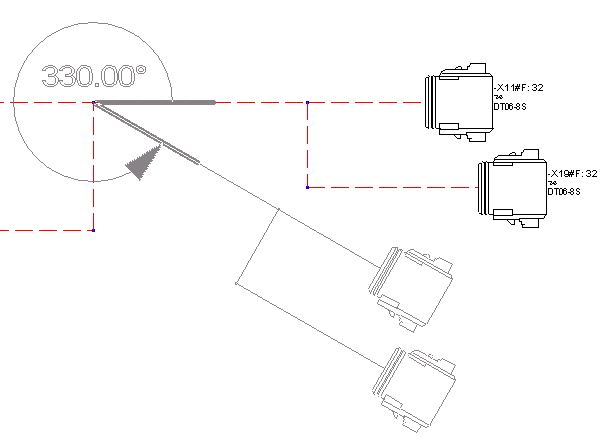
It is also possible to rotate branches. To do so, the command can be activated by clicking on the  toolbar button of the Formboard toolbar, or by means of the Edit -> Rotate Branch command on the Main Menu bar.
To rotate a connector and the line connected, click on the connector after activating the Rotate branch command.
To rotate a more complex branch, proceed as follows:
-
Activate the Rotate branch command;
-
Select the node to be the rotation point;
-
Select a line connected to this rotation point;
-
Move the mouse to rotate the defined branch;
-
The default rotation angle is defined in the settings.
-
Holding down the Shift key enables a free angle rotation
-
Note
-
The angle between branch and X-axis is displayed during rotation.
-
The angle used for snapping during rotation can be set in theFormboard settings (Rotate Branch -> Angle to rotate). The default value for new projects without this option is 15°.
-
Snapping can be deactivated temporarily by holding down SHIFT.