
Store Visibility / Export Structure
Store Visibility
To save the variant/option, package or configuration/harness family/harness derivative checkbox setting, i.e. the visibility, to an external file (as *.xml file)
-
right-click on the project name in the Variants/Options tree view,
-
select the Store visibility command from the context menu and
-
complete the following dialog box:
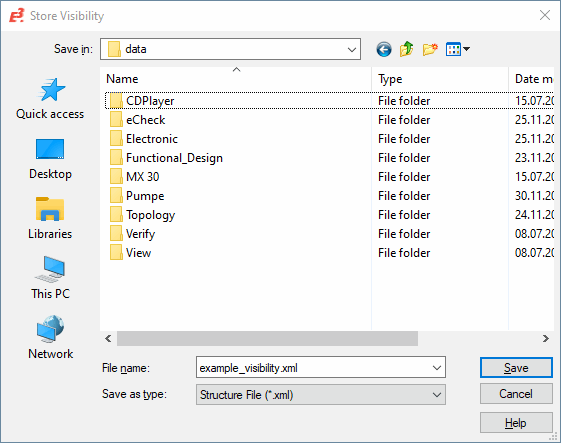
|
Store Visibility |
|
|---|---|
|
Save in |
Selection of drive and folder to save the file in. |
|
File name |
Define a file name. |
|
Save as type |
The predefined file type is a *.xml file. |
|
Save/Cancel |
Select Save to close the dialog box and save the file with the defined information, or Cancel to abort the operation. |
Note
The Store Visibility command stores the checkboxes' status (checked / unchecked).
Export Structure
To save the variant/option, package or configuration/harness family/harness derivative checkbox setting, i.e. the structure, to an external file (as *.xml file)
-
right-click on the project name in the Variants/Options tree view,
-
select the Export structure... command from the context menu and
-
complete the following dialog box:
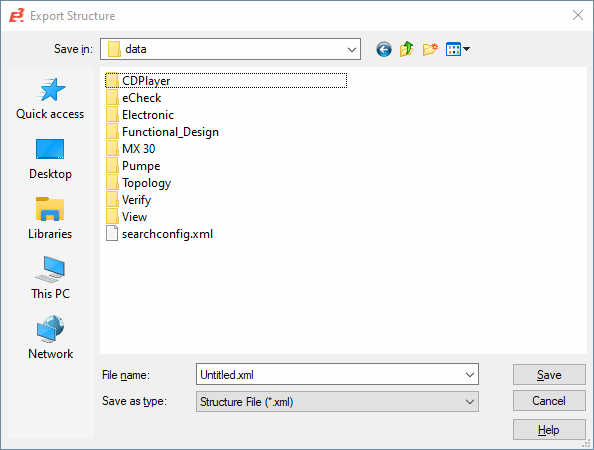
|
Export Structure |
|
|---|---|
|
Save in |
Selection of drive and folder to save the file in. |
|
File name |
Define a file name. |
|
Save as type |
The predefined file type is a *.xml file. |
|
Save/Cancel |
Select Save to close the dialog box and save the file with the defined information, or Cancel to abort the operation. |
Note
The Export structure... command saves the visibility and the individual elements' existence, i.e. the structure within the Variants/Options tree.
Meaning of the XML-Export file of Variants/Options Structure
The following example displays the XML-elements for the XML-export file of the variants/options structure.
Programming text
<?xml version="1.0" encoding="UTF-16" standalone="no"?>
<e3options version="2.0"contenttype="STRUCTURE">
<option id="ID1"name="New"visibility="false"mustexist="false"activation="0-N">
<attribute name="BOMLength"value="Test"/>
<option id="ID2"name="New1"visibility="false"mustexist="false"description="DescTest"/>
<option id="ID3"name="New2"visibility="false"mustexist="false"/>
</option>
<option id="ID4"name="New3"visibility="true"mustexist="true"activation="1-N">
<option id="ID7"name="New6"visibility="true"mustexist="false">
<exclusive>
<optionref idref="ID5"/>
</exclusive>
</option>
<option id="ID6"name="New5"visibility="false"mustexist="false"/>
</option>
<option id="ID5"name="New4"visibility="false"mustexist="false"/>
<package id="ID8"name="P1"visibility="false">
<inclusive>
<optionref idref="ID2"/>
<optionref idref="ID4"/>
</inclusive>
</package>
<configuration id="ID9"name="C1"visibility="false"/>
<family id="ID10"name="F1"visibility="false">
<derivate id="ID11"name="D1"visibility="false"/>
<derivate id="ID12"name="D2"visibility="false"/>
</family>
<option id="ID13"name="Vars"visibility="true"mustexist="false"activation="ONE">
<option id="ID14"name="New7"visibility="true"/>
</option>
</e3options>
Meaning of the XML-elements
<?xml version="1.0" encoding="UTF-16" standalone="no"?>
XML-Declaration
<e3options>
Root element
<option> / <package> / <configuration> / <family>
Possible sub-element types: Option, Package, Configuration and Harness Family
<attribute>
Optional Element
name (mandatory tag)
Designation of attributes
value (mandatory tag)
Value of attributes
<option> (Optional for sub-element <option>)
Options group with its sub-options
inclusive
exclusive
Defines the inclusive/exclusive assignment
optionsref
Is used to reference to other options (with the corresponding id) within the XML-file)
Further optional tags for the sub-element <option>:
mustexist
Possible values: true / false
activation
Possible values: 0-N / 1-N / ONE
<attribute>
Optional for the sub-elements <package> and <configuration>
inclusive
exclusive
Defines the inclusive/exclusive assignment
<derivate>
Optional for the sub-element <family>
inclusive
exclusive
Defines the inclusive/exclusive assignment
id
name
visibility
Mandatory attributes for the sub-elements
<option> / <package> / <configuration> / <family> / <derivate>
id Clear value for all files
Clear value in format ID<nnn>
name Defines the name of elements
visibility Defines the visibility of elements
Possible values: true / false
Optional attribute for the sub-elements <option> / <package> / <configuration> / <family> / <derivate
description
Description for the corresponding attribute