
Add Node
This command is only available, when a E3.formboard license is present!
Nodes can be added to segments on formboard plans, for example, in order to place a nail as a deviating point. These nodes separate the segment in two.
This is required, for example, when connecting to an existing segment.
To define the node,
-
select the Insert -> Node command from the Main Menu bar, or
-
right-click on a connect line and select the Add Node command from the displayed context menu, or
-
select the Insert new Node
 toolbar button.
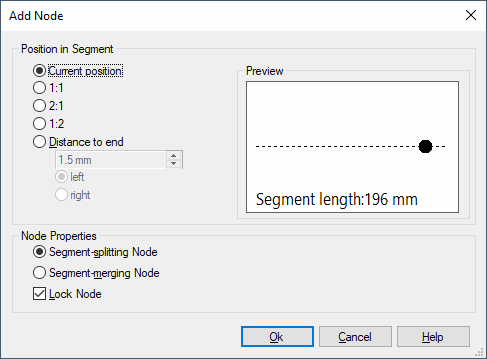
The following dialog box is displayed:
Remarks on the nodes' placement in the grid:
-
Nodes are placed on horizontal and vertical lines according to the grid defined.
-
When pressing the CTRL key, nodes are placed in the alternative grid.
-
When pressing the SHIFT key, nodes are placed with a relation of 1:2; 1:1; 2:1.
-
The grid definition does not apply to angular lines (exception SHIFT key).
|
Add Node |
|
|---|---|
Position in Segment
|
|
|
Current position |
Inserts a node at the position where the command was selected. |
|
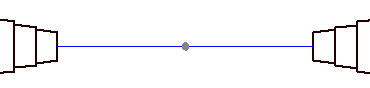
1:1 |
Separates the segment at the segment's center.
Example
|
|
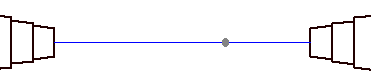
2:1 |
Separates the segment into two parts: two thirds of the segment on the left, one third on the right.
Example
|
|
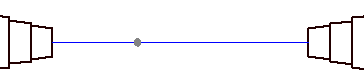
1:2 |
Separates the segment into two parts: two thirds of the segment on the right, one third on the left.
Example
|
|
Distance to end |
Check this option to add a node on a relative position of the segment's ends. |
|
left/right or up/down |
When selecting Distance to end two other options become active that allow to decide between left/right or up/down.
Moreover, an input field for the length becomes active. |
|
Preview |
Displays the selected segment with the selected node position. |
Node Properties |
|
|
Segment-splitting Node |
Creates a segment-splitting node. After inserting the segment is split. |
|
Segment-merging Node |
Creates a segment-merging node. After inserting the segment is not disconnected. |
|
Lock Node |
Fixes the inserted new node. |
Note
When a node is added to a segment, the effective direction of the original segment is transferred to the new one.