
Place New View command for Devices
To add a new device view to the drawing,
-
right-click on the desired device in the Device Tree View of the Project Window
-
select Place New Device View... on the displayed context menu.
The following dialog will be displayed:
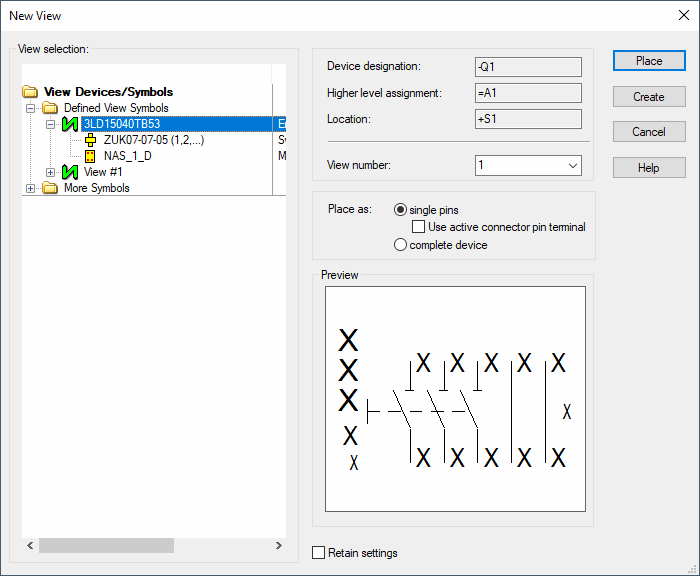
|
New View |
|
|---|---|
|
View selection View Devices/Symbols Defined View Structure More Symbols |
Lists all symbol views available in the database and in the project. |
|
Device Designation |
The Device Designation of the device is displayed. |
|
Higher Level Assignment |
The Higher Level Assignment of the device is displayed. |
|
Location |
The Location of the device is displayed. |
|
View number |
Each new device view is assigned a number that must be unique within all views of that device. The drop-down list shows all free view numbers. The view number determines if conductor logic lines are drawn. These logic lines are only visible between views of the same number and can later on be completely switched off for individual view numbers. |
|
Place as |
These options are only active, when a connector symbol is selected in the More Symbols tree view. |
|
single pins |
Check this option to place the view in single pin representation. |
|
Use active connector pin terminal |
Check this option to use the connector pin terminals defined in the database for this connector. When the connector pin terminal is not defined, or not defined in the database, connector pin terminals are not placed. All pins that could not be placed are reported in the Output window.
Note
|
|
complete device |
Check this option to place the view as complete device. |
|
Preview |
Displays a preview of the defined view. |
|
Retain settings |
Activate this checkbox to have the currently defined settings set when recalling this dialog. If the user wants to have the previous settings set, the checkbox has to be unchecked, which immediately displays the default values for the device. |
|
Place |
Places the view. |